Introduction To Nav2 Specific Nodes
Warning
- Vocabulary can be a large point of confusion here when first starting out.
A
Nodewhen discussing BTs is entirely different than aNodein the ROS 2 contextAn
ActionNodein the context of BTs is not necessarily connected to an Action Server in the ROS 2 context (but often it is)
There are quite a few custom Nav2 BT nodes that are provided to be used in the Nav2 specific fashion. Some commonly used Nav2 nodes will be described below. The full list of custom BT nodes can be found in the nav2_behavior_tree plugins folder. The configuration guide can also be quite useful.
Action Nodes
ComputePathToPose - ComputePathToPose Action Server Client (Planner Interface)
FollowPath - FollowPath Action Server Client (Controller Interface)
Spin, Wait, Backup - Behaviors Action Server Client
ClearCostmapService - ClearCostmapService Server Clients
Upon completion, these action nodes will return SUCCESS if the action server believes the action has been completed correctly, RUNNING when still running, and will return FAILURE otherwise. Note that in the above list,
the ClearCostmapService action node is not an action server client, but a service client.
Condition Nodes
GoalUpdated - Checks if the goal on the goal topic has been updated
GoalReached - Checks if the goal has been reached
InitialPoseReceived - Checks to see if a pose on the
intial_posetopic has been receivedisBatteryLow - Checks to see if the battery is low by listening on the battery topic
The above list of condition nodes can be used to probe particular aspects of the system. Typically they will return SUCCESS if the condition is true and FAILURE otherwise.
The key condition that is used in the default Nav2 BT is GoalUpdated which is checked asynchronously within particular subtrees. This condition node allows for the behavior described as “If the goal has been updated, then we must replan”.
Condition nodes are typically paired with ReactiveFallback nodes.
Decorator Nodes
Distance Controller - Will tick children nodes every time the robot has traveled a certain distance
Rate Controller - Controls the ticking of its child node at a constant frequency. The tick rate is an exposed port
Goal Updater - Will update the goal of children nodes via ports on the BT
Single Trigger - Will only tick its child node once, and will return
FAILUREfor all subsequent ticksSpeed Controller - Controls the ticking of its child node at a rate proportional to the robot’s speed
Control: PipelineSequence
The PipelineSequence control node re-ticks previous children when a child returns RUNNING.
This node is similar to the Sequence node, with the additional property that the children prior to the “current” are re-ticked, (resembling the flow of water in a pipe).
If at any point a child returns FAILURE, all children will be halted and the parent node will also return FAILURE. Upon SUCCESS of the last node in the sequence, this node will halt and return SUCCESS.
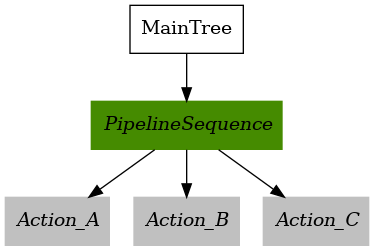
To explain this further, here is an example BT that uses PipelineSequence.
<root main_tree_to_execute="MainTree">
    <BehaviorTree ID="MainTree">
        <PipelineSequence>
            <Action_A/>
            <Action_B/>
            <Action_C/>
        </PipelineSequence>
    </BehaviorTree>
</root>
Action_A,Action_B, andAction_Care allIDLE.When the parent PipelineSequence is first ticked, let’s assume
Action_AreturnsRUNNING. The parent node will now returnRUNNINGand no other nodes are ticked.
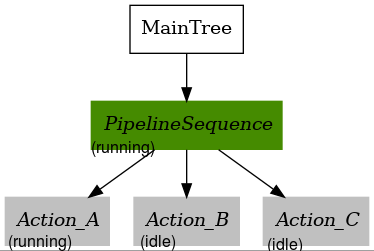
Now, let’s assume
Action_AreturnsSUCCESS,Action_Bwill now get ticked and will returnRUNNING.Action_Chas not yet been ticked so will returnIDLE.
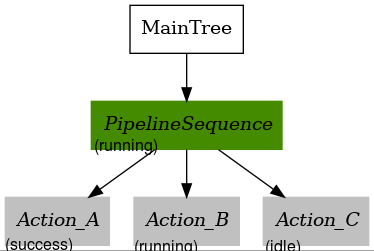
Action_Agets ticked again and returnsRUNNING, andAction_Bgets re-ticked and returnsSUCCESSand therefore the BT goes on to tickAction_Cfor the first time. Let’s assumeAction_CreturnsRUNNING. The retick-ing ofAction_Ais what makes PipelineSequence useful.
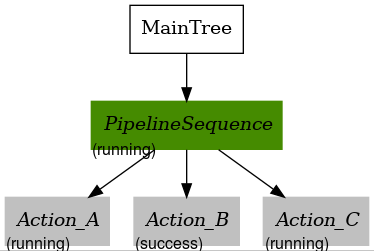
All actions in the sequence will be re-ticked. Let’s assume
Action_Astill returnsRUNNING, where asAction_BreturnsSUCCESSagain, andAction_Cnow returnsSUCCESSon this tick. The sequence is now complete, and thereforeAction_Ais halted, even though it was stillRUNNING.
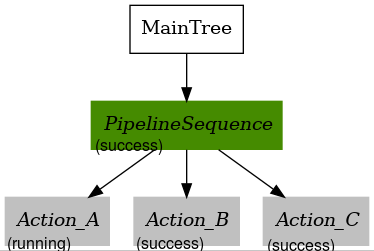
Recall that if Action_A, Action_B, or Action_C returned FAILURE at any point of time, the parent would have returned FAILURE and halted any children as well.
For additional details regarding the PipelineSequence please see the PipelineSequence configuration guide.
Control: Recovery
The Recovery control node has only two children and returns SUCCESS if and only if the first child returns SUCCESS.
If the first child returns FAILURE, the second child will be ticked. This loop will continue until either:
The first child returns
SUCCESS(which results inSUCCESSof the parent node)The second child returns
FAILURE(which results inFAILUREof the parent node)The
number_of_retriesinput parameter is violated
This node is usually used to link together an action, and a recovery action as the name suggests. The first action will typically be the “main” behavior,
and the second action will be something to be done in case of FAILURE of the main behavior. Often, the ticking of the second child action will promote the chance the first action will succeed.
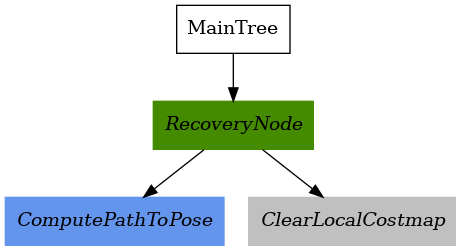
<root main_tree_to_execute="MainTree">
    <BehaviorTree ID="MainTree">
        <RecoveryNode number_of_retries="1">
            <ComputePathToPose/>
            <ClearLocalCostmap/>
        </RecoveryNode>
    </BehaviorTree>
</root>
In the above example, let’s assume ComputePathToPose fails. ClearLocalCostmap will be ticked in response, and return SUCCESS.
Now that we have cleared the costmap, let’s say the robot is correctly able to compute the path and ComputePathToPose now returns SUCCESS. Then, the parent RecoveryNode will also return SUCCESS and the BT will be complete.
For additional details regarding the RecoveryNode please see the RecoveryNode configuration guide.
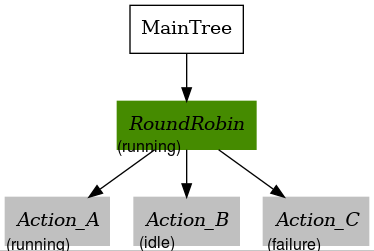
Control: RoundRobin
The RoundRobin control node ticks its children in a round robin fashion until a child returns SUCCESS, in which the parent node will also return SUCCESS.
If all children return FAILURE so will the parent RoundRobin.
Here is an example BT we will use to walk through the concept.
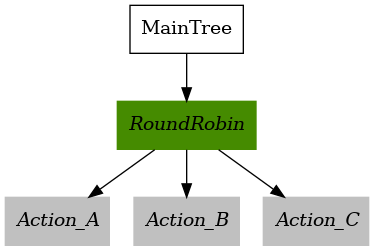
<root main_tree_to_execute="MainTree">
    <BehaviorTree ID="MainTree">
        <RoundRobin>
            <Action_A/>
            <Action_B/>
            <Action_C/>
        </RoundRobin>
    </BehaviorTree>
</root>
All the nodes start at
IDLE
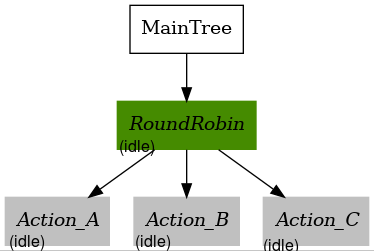
2. Upon tick of the parent node, the first child (Action_A) is ticked. Let’s assume on tick the child returns RUNNING.
In this case, no other children are ticked and the parent node returns RUNNING as well.
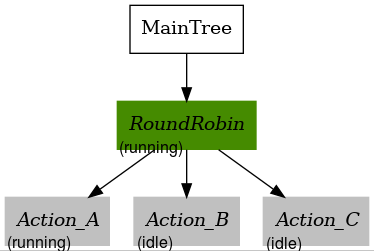
3. Upon the next tick, let’s assume that Action_A returns FAILURE.
This means that Action_B will get ticked next, and Action_C remains unticked.
Let’s assume Action_B returns RUNNING this time. That means the parent RoundRobin node will also return RUNNING.
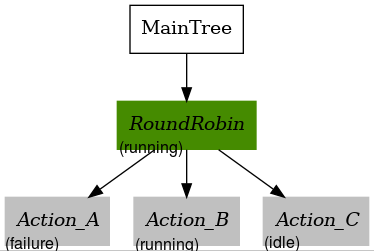
4. Upon this next tick, let’s assume that Action_B returns SUCCESS. The parent RoundRobin will now halt all children and return SUCCESS.
The parent node retains this state information, and will tick Action_C upon the next tick rather than start from Action_A like Step 2 did.
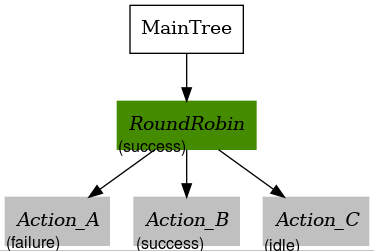
On this tick, let’s assume
Action_CreturnsRUNNING, and so does the parent RoundRobin. No other nodes are ticked.
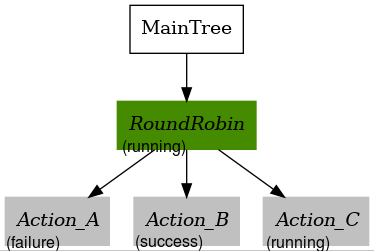
On this last tick, let’s assume
Action_CreturnsFAILURE. The parent will circle and tickAction_Aagain.Action_AreturnsRUNNINGand so will the parent RoundRobin node. This pattern will continue indefinitely unless all children returnFAILURE.
For additional details regarding the RecoveryNode please see the RoundRobin configuration guide.