



















Ailibot2仿真入门教程-加载Ailibot2的SDF模型到gazebo
纠错,疑问,交流: 请进入讨论区或 请点击进入页面,扫码加入微信群或Q群进行交流
获取最新文章: 扫一扫加入“创客智造”公众号
文章说明
- 本教程主要介绍如何加载Ailibot2的SDF模型到gazebo
操作步骤
- 启动gazebo仿真,加载Ailibot2的SDF模型
$ ros2 launch ailibot2_bringup robot_sim_with_sdf.launch.py use_rviz:=true
[INFO] [launch]: All log files can be found below /home/ubuntu/.ros/log/2023-09-07-12-05-31-122302-ailibotOS-VM-8978
[INFO] [launch]: Default logging verbosity is set to INFO
 GAZEBO_MODEL_PATH:  /usr/share/gazebo-11/models::/home/ubuntu/ros2_ailibot2_sim_ws/install/ailibot2_description/share/ailibot2_description/meshes
[INFO] [robot_state_publisher-1]: process started with pid [8981]
[INFO] [gzserver-2]: process started with pid [8983]
[INFO] [gzclient   -3]: process started with pid [8985]
[INFO] [spawn_entity.py-4]: process started with pid [8988]
[robot_state_publisher-1] Link base_link had 8 children
[robot_state_publisher-1] Link camera_bottom_screw_frame had 1 children
[robot_state_publisher-1] Link camera_link had 1 children
[robot_state_publisher-1] Link camera_depth_frame had 4 children
[robot_state_publisher-1] Link camera_color_frame had 1 children
[robot_state_publisher-1] Link camera_color_optical_frame had 0 children
[robot_state_publisher-1] Link camera_depth_optical_frame had 0 children
[robot_state_publisher-1] Link camera_left_ir_frame had 1 children
[robot_state_publisher-1] Link camera_left_ir_optical_frame had 0 children
[robot_state_publisher-1] Link camera_right_ir_frame had 1 children
[robot_state_publisher-1] Link camera_right_ir_optical_frame had 0 children
[robot_state_publisher-1] Link caster_back_link had 0 children
[robot_state_publisher-1] Link caster_front_link had 0 children
[robot_state_publisher-1] Link imu_link had 0 children
[robot_state_publisher-1] Link laser_link had 0 children
[robot_state_publisher-1] Link sonar_front_link had 0 children
[robot_state_publisher-1] Link wheel_left_link had 0 children
[robot_state_publisher-1] Link wheel_right_link had 0 children
[robot_state_publisher-1] [INFO] [1694059532.660441133] [robot_state_publisher]: got segment base_footprint
[robot_state_publisher-1] [INFO] [1694059532.660568092] [robot_state_publisher]: got segment base_link
[robot_state_publisher-1] [INFO] [1694059532.660581127] [robot_state_publisher]: got segment camera_bottom_screw_frame
[robot_state_publisher-1] [INFO] [1694059532.660586826] [robot_state_publisher]: got segment camera_color_frame
[robot_state_publisher-1] [INFO] [1694059532.660591711] [robot_state_publisher]: got segment camera_color_optical_frame
[robot_state_publisher-1] [INFO] [1694059532.660610149] [robot_state_publisher]: got segment camera_depth_frame
[robot_state_publisher-1] [INFO] [1694059532.660617151] [robot_state_publisher]: got segment camera_depth_optical_frame
[robot_state_publisher-1] [INFO] [1694059532.660621725] [robot_state_publisher]: got segment camera_left_ir_frame
[robot_state_publisher-1] [INFO] [1694059532.660626340] [robot_state_publisher]: got segment camera_left_ir_optical_frame
[robot_state_publisher-1] [INFO] [1694059532.660630679] [robot_state_publisher]: got segment camera_link
[robot_state_publisher-1] [INFO] [1694059532.660635211] [robot_state_publisher]: got segment camera_right_ir_frame
[robot_state_publisher-1] [INFO] [1694059532.660639759] [robot_state_publisher]: got segment camera_right_ir_optical_frame
[robot_state_publisher-1] [INFO] [1694059532.660644230] [robot_state_publisher]: got segment caster_back_link
[robot_state_publisher-1] [INFO] [1694059532.660648655] [robot_state_publisher]: got segment caster_front_link
[robot_state_publisher-1] [INFO] [1694059532.660652978] [robot_state_publisher]: got segment imu_link
[robot_state_publisher-1] [INFO] [1694059532.660657278] [robot_state_publisher]: got segment laser_link
[robot_state_publisher-1] [INFO] [1694059532.660661839] [robot_state_publisher]: got segment sonar_front_link
[robot_state_publisher-1] [INFO] [1694059532.660666095] [robot_state_publisher]: got segment wheel_left_link
[robot_state_publisher-1] [INFO] [1694059532.660670503] [robot_state_publisher]: got segment wheel_right_link
[spawn_entity.py-4] [INFO] [1694059533.453061905] [spawn_entity]: Spawn Entity started
[spawn_entity.py-4] [INFO] [1694059533.453582284] [spawn_entity]: Loading entity XML from file /home/ubuntu/ros2_ailibot2_sim_ws/install/ailibot2_gazebo/share/ailibot2_gazebo/models/ailibot2/d2/ailibot_d2.sdf
[spawn_entity.py-4] [INFO] [1694059533.466719430] [spawn_entity]: Waiting for service /spawn_entity, timeout = 5
[spawn_entity.py-4] [INFO] [1694059533.467070718] [spawn_entity]: Waiting for service /spawn_entity
[spawn_entity.py-4] [INFO] [1694059535.376824884] [spawn_entity]: Calling service /spawn_entity
[spawn_entity.py-4] [INFO] [1694059536.590096599] [spawn_entity]: Spawn status: SpawnEntity: Successfully spawned entity [ailibot2]
[INFO] [spawn_entity.py-4]: process has finished cleanly [pid 8988]
[gzserver-2] [INFO] [1694059537.684684673] [GazeboRealsenseNode]: Realsense Gazebo ROS plugin loading.
[gzserver-2]
[gzserver-2] RealSensePlugin: The realsense_camera plugin is attach to model ailibot2
[gzserver-2] [INFO] [1694059538.412087799] [GazeboRealsenseNode]: Loaded Realsense Gazebo ROS plugin.
[gzserver-2] [INFO] [1694059538.537634923] [diff_drive]: Wheel pair 1 separation set to [0.325140m]
[gzserver-2] [INFO] [1694059538.537767828] [diff_drive]: Wheel pair 1 diameter set to [0.115000m]
[gzserver-2] [INFO] [1694059538.539091745] [diff_drive]: Subscribed to [/cmd_vel]
[gzserver-2] [INFO] [1694059538.572421130] [diff_drive]: Advertise odometry on [/odom]
[gzserver-2] [INFO] [1694059538.610411054] [diff_drive]: Publishing odom transforms between [odom] and [base_footprint]
[gzserver-2] [INFO] [1694059538.678657658] [joint_state]: Going to publish joint [wheel_left_joint]
[gzserver-2] [INFO] [1694059538.678744839] [joint_state]: Going to publish joint [wheel_right_joint]
[gzclient   -3] context mismatch in svga_surface_destroy
[gzclient -3] context mismatch in svga_surface_destroy- 可选参数:
- 场景类型:
world_type:=basic - robot类型:
robot_type:=d2,可选择d2/d4/o3/o4/m4 - 模型类型:
model_type:=d2,可选择d2或d2_ekf等
- 场景类型:
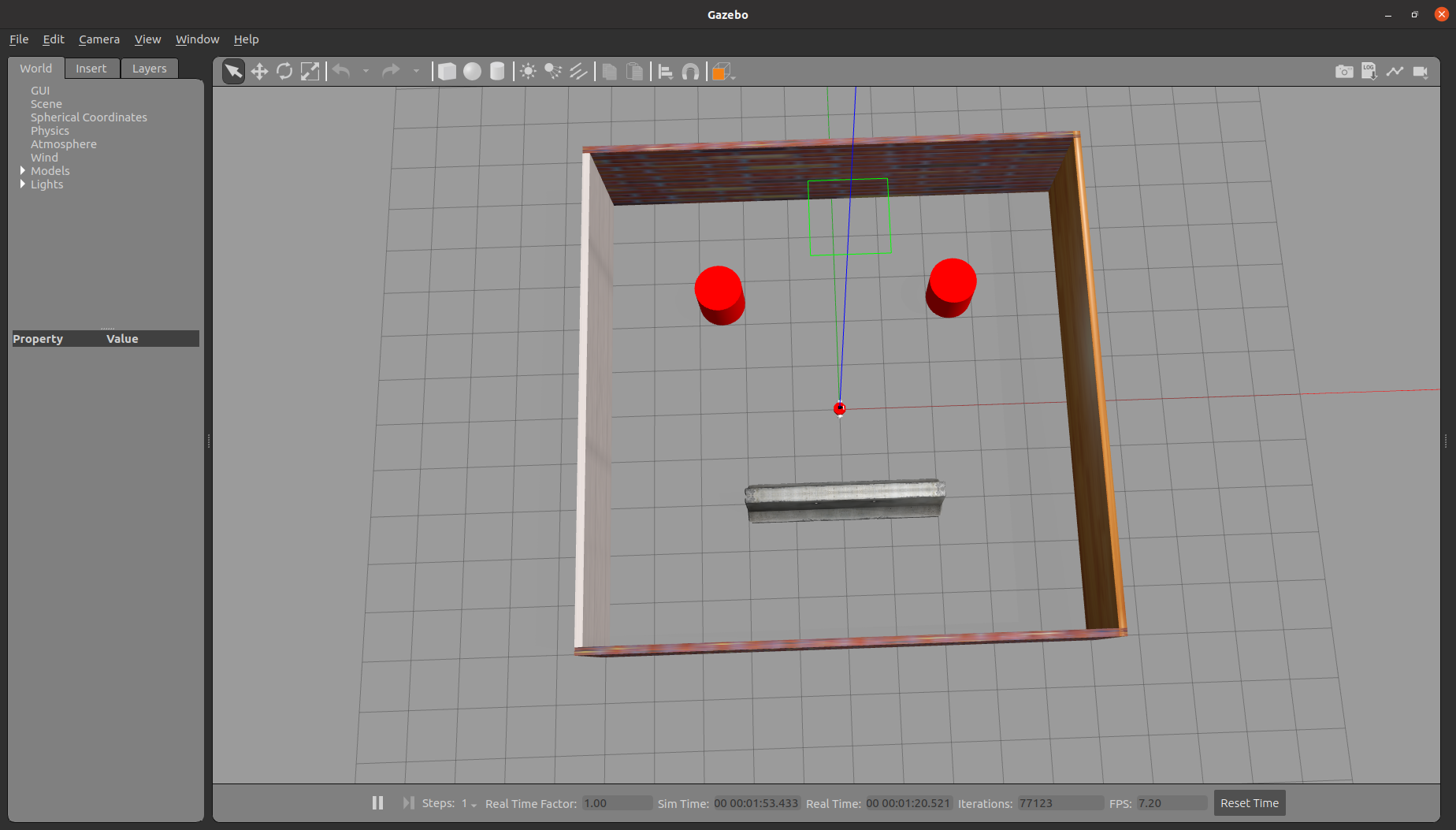
- 查看话题
$ ros2 topic list
/camera/color/camera_info
/camera/color/image_raw
/camera/color/image_raw/compressed
/camera/depth/camera_info
/camera/depth/color/points
/camera/depth/image_rect_raw
/camera/depth/image_rect_raw/compressed
/camera/infra1/camera_info
/camera/infra1/image_raw
/camera/infra1/image_raw/compressed
/camera/infra2/camera_info
/camera/infra2/image_raw
/camera/infra2/image_raw/compressed
/clock
/cmd_vel
/imu/data
/joint_states
/odom
/parameter_events
/performance_metrics
/robot_description
/rosout
/scan
/sensor/sonar_front
/tf
/tf_static- 当前展示ailibot2-d2SDF模型的具体代码
<?xml version="1.0" ?>
<sdf version="1.5">
  <model name="ailibot_d2">
  <static>false</static>

  <!-- ****************** ROBOT BASE FOOTPRINT ***************************  -->
  <pose>0.0 0.0 0 0.0 0.0 0.0</pose>
  <link name="base_footprint"/>

  <!-- ********************** ROBOT BASE *********************************  -->
  <link name="base_link">
    <collision name="base_collision">
      <pose>0 0 0.0448 0 0 0</pose>
      <geometry>
        <cylinder>
          <radius>0.12657</radius>
          <length>0.09</length>
        </cylinder>
      </geometry>
    </collision>

    <visual name="base_visual">
      <pose>0 0 0 0 0 0</pose>
      <geometry>
        <mesh>
          <uri>model://d2/d2_base.STL</uri>
        </mesh>
      </geometry>
      <material>
        <ambient>1.0 0.0 0.0 1.0</ambient>
        <diffuse>1.0 0.0 0.0 1.0</diffuse>
        <specular>0.0 0.0 0.0 1.0</specular>
        <emissive>0.0 0.0 0.0 1.0</emissive>
      </material>
    </visual>
  </link>

  <!-- *********************** IMU SENSOR SETUP **************************  -->
  <link name="imu_link">
    <gravity>true</gravity>
    <sensor name="twr_imu" type="imu">
      <always_on>true</always_on>
      <update_rate>100</update_rate>
      <visualize>true</visualize>
      <imu>
        <orientation>
          <x>
            <noise type="gaussian">
              <mean>0.0</mean>
              <stddev>2e-3</stddev>
            </noise>
          </x>
          <y>
            <noise type="gaussian">
              <mean>0.0</mean>
              <stddev>2e-3</stddev>
            </noise>
          </y>
          <z>
            <noise type="gaussian">
              <mean>0.0</mean>
              <stddev>2e-3</stddev>
            </noise>
          </z>
        </orientation>
        <angular_velocity>
          <x>
            <noise type="gaussian">
              <mean>0.0</mean>
              <stddev>2e-4</stddev>
            </noise>
          </x>
          <y>
            <noise type="gaussian">
              <mean>0.0</mean>
              <stddev>2e-4</stddev>
            </noise>
          </y>
          <z>
            <noise type="gaussian">
              <mean>0.0</mean>
              <stddev>2e-4</stddev>
            </noise>
          </z>
        </angular_velocity>
        <linear_acceleration>
          <x>
            <noise type="gaussian">
              <mean>0.0</mean>
              <stddev>1.7e-2</stddev>
            </noise>
          </x>
          <y>
            <noise type="gaussian">
              <mean>0.0</mean>
              <stddev>1.7e-2</stddev>
            </noise>
          </y>
          <z>
            <noise type="gaussian">
              <mean>0.0</mean>
              <stddev>1.7e-2</stddev>
            </noise>
          </z>
        </linear_acceleration>
      </imu>
      <plugin name="imu" filename="libgazebo_ros_imu_sensor.so">
        <initial_orientation_as_reference>false</initial_orientation_as_reference>
        <frame_name>imu_link</frame_name>
        <ros>
          <namespace>/imu</namespace>
          <remapping>~/out:=data</remapping>
        </ros>
      </plugin>
    </sensor>
  </link>

  <!-- ****************************** LIDAR *****************************    -->
  <link name="laser_link">
    <inertial>
      <inertia>
        <ixx>0.001</ixx>
        <ixy>0.000</ixy>
        <ixz>0.000</ixz>
        <iyy>0.001</iyy>
        <iyz>0.000</iyz>
        <izz>0.001</izz>
      </inertia>
      <mass>0.114</mass>
    </inertial>

    <collision name="laser_collision">
      <pose>0 0 0.1685 0 0 0</pose>
      <geometry>
        <cylinder>
          <radius>0.035</radius>
          <length>0.058</length>
        </cylinder>
      </geometry>
    </collision>

    <visual name="laser_visual">
      <pose>0 0 0.185 0 0 0</pose>
      <geometry>
        <mesh>
          <uri>model://sensors/laser/rplidar-a1.STL</uri>
        </mesh>
      </geometry>
      <material>
        <ambient>0.0 0.0 0.0 1.0</ambient>
        <diffuse>0.0 0.0 0.0 1.0</diffuse>
        <specular>0.0 0.0 0.0 1.0</specular>
        <emissive>0.0 0.0 0.0 1.0</emissive>
      </material>
    </visual>

    <sensor name="laser" type="ray">
      <always_on>true</always_on>
      <visualize>false</visualize>
      <update_rate>5</update_rate>
      <ray>
        <scan>
          <horizontal>
            <samples>360</samples>
            <resolution>1.000000</resolution>
            <min_angle>-3.14159</min_angle>
            <max_angle>3.14159</max_angle>
          </horizontal>
        </scan>
        <range>
          <min>0.3</min>
          <max>15.0</max>
          <resolution>0.015</resolution>
        </range>
        <noise>
          <type>gaussian</type>
          <mean>0.0</mean>
          <stddev>0.01</stddev>
        </noise>
      </ray>
      <plugin name="scan" filename="libgazebo_ros_ray_sensor.so">
        <ros>
          <remapping>~/out:=scan</remapping>
        </ros>
        <output_type>sensor_msgs/LaserScan</output_type>
        <frame_name>laser_link</frame_name>
      </plugin>
    </sensor>
  </link>

  <!-- ****************************** CAMERA *****************************    -->
  <link name="camera_link">
    <pose>0.0929 0 0.1325 0 0 0</pose>
    <visual name="realsense_link_visual">
      <pose>0 0 0 1.57 0 1.57</pose>
      <geometry>
        <mesh>
          <uri>model://sensors/camera/realsense_d435.stl</uri>
        </mesh>
      </geometry>
    </visual>
    <collision name="realsense_link_collision">
      <pose>-0.0149 0 0 0 0 0</pose>
      <geometry>
        <box>
          <size>0.03 0.090 0.025</size>
        </box>
      </geometry>
    </collision>
    <inertial>
      <pose>0 0 0 0 0 0</pose>
      <inertia>
        <ixx>0.001</ixx>
        <ixy>0.000</ixy>
        <ixz>0.000</ixz>
        <iyy>0.001</iyy>
        <iyz>0.000</iyz>
        <izz>0.001</izz>
      </inertia>
      <mass>0.1</mass>
    </inertial>

    <sensor name="cameradepth" type="depth">
      <camera name="camera">
        <horizontal_fov>1.57</horizontal_fov>
        <image>
          <width>1280</width>
          <height>720</height>
        </image>
        <clip>
          <near>0.1</near>
          <far>100</far>
        </clip>
        <noise>
          <type>gaussian</type>
          <mean>0.0</mean>
          <stddev>0.100</stddev>
        </noise>
      </camera>
      <always_on>1</always_on>
      <update_rate>30</update_rate>
      <visualize>0</visualize>
    </sensor>
    <sensor name="cameracolor" type="camera">
      <camera name="camera">
        <horizontal_fov>1.57</horizontal_fov>
        <image>
          <width>1280</width>
          <height>720</height>
          <format>RGB_INT8</format>
        </image>
        <clip>
          <near>0.1</near>
          <far>100</far>
        </clip>
        <noise>
          <type>gaussian</type>
          <mean>0.0</mean>
          <stddev>0.007</stddev>
        </noise>
      </camera>
      <always_on>1</always_on>
      <update_rate>30</update_rate>
      <visualize>0</visualize>
    </sensor>
    <sensor name="cameraired1" type="camera">
      <camera name="camera">
        <horizontal_fov>1.57</horizontal_fov>
        <image>
          <width>1280</width>
          <height>720</height>
          <format>L_INT8</format>
        </image>
        <clip>
          <near>0.1</near>
          <far>100</far>
        </clip>
        <noise>
          <type>gaussian</type>
          <mean>0.0</mean>
          <stddev>0.05</stddev>
        </noise>
      </camera>
      <always_on>1</always_on>
      <update_rate>1</update_rate>
      <visualize>0</visualize>
    </sensor>
    <sensor name="cameraired2" type="camera">
      <camera name="camera">
        <horizontal_fov>1.57</horizontal_fov>
        <image>
          <width>1280</width>
          <height>720</height>
          <format>L_INT8</format>
        </image>
        <clip>
          <near>0.1</near>
          <far>100</far>
        </clip>
        <noise>
          <type>gaussian</type>
          <mean>0.0</mean>
          <stddev>0.05</stddev>
        </noise>
      </camera>
      <always_on>1</always_on>
      <update_rate>1</update_rate>
      <visualize>0</visualize>
    </sensor>
  </link>

  <joint name="camera_joint" type="fixed">
    <parent>base_link</parent>
    <child>camera_link</child>
    <pose>0 0 0 0 0 0</pose>
  </joint>

    <plugin name="camera" filename="librealsense_gazebo_plugin.so">
      <prefix>camera</prefix>
      <depthUpdateRate>30.0</depthUpdateRate>
      <colorUpdateRate>30.0</colorUpdateRate>
      <infraredUpdateRate>1.0</infraredUpdateRate>
      <depthTopicName>/camera/depth/image_rect_raw</depthTopicName>
      <depthCameraInfoTopicName>/camera/depth/camera_info</depthCameraInfoTopicName>
      <colorTopicName>/camera/color/image_raw</colorTopicName>
      <colorCameraInfoTopicName>/camera/color/camera_info</colorCameraInfoTopicName>
      <infrared1TopicName>/camera/infra1/image_raw</infrared1TopicName>
      <infrared1CameraInfoTopicName>/camera/infra1/camera_info</infrared1CameraInfoTopicName>
      <infrared2TopicName>/camera/infra2/image_raw</infrared2TopicName>
      <infrared2CameraInfoTopicName>infra2/camera_info</infrared2CameraInfoTopicName>
      <colorOpticalframeName>camera_color_optical_frame</colorOpticalframeName>
      <depthOpticalframeName>camera_depth_optical_frame</depthOpticalframeName>
      <infrared1OpticalframeName>camera_left_ir_optical_frame</infrared1OpticalframeName>
      <infrared2OpticalframeName>camera_right_ir_optical_frame</infrared2OpticalframeName>
      <rangeMinDepth>0.3</rangeMinDepth>
      <rangeMaxDepth>3.0</rangeMaxDepth>
      <pointCloud>true</pointCloud>
      <pointCloudTopicName>/camera/depth/color/points</pointCloudTopicName>
      <pointCloudCutoff>0.3</pointCloudCutoff>
    </plugin>

  <!-- ****************************** SONAR_FRONT *****************************    -->
  <link name="sonar_front_link">
    <pose>0 0 0 0 0 0</pose>
    <visual name="sonar_front_visual">
      <pose>0.11297 0 0.045 0 0 0</pose>
      <geometry>
          <mesh>
            <uri>model://sensors/sonar/sonar.STL</uri>
          </mesh>
      </geometry>
    </visual>
    <collision name="sonar_front_collision">
      <pose>0.11297 0 0.045 0 0 0</pose>
      <geometry>
        <box>
          <size>0.01 0.01 0.01</size>
        </box>
      </geometry>
    </collision>
    <inertial>
        <pose>0 0 0 0 0 0</pose>
        <inertia>
          <ixx>0.001</ixx>
          <ixy>0.000</ixy>
          <ixz>0.000</ixz>
          <iyy>0.001</iyy>
          <iyz>0.000</iyz>
          <izz>0.001</izz>
        </inertia>
        <mass>0.1</mass>
    </inertial>
    <sensor name="sonar_front" type="ray">
      <pose>0.11297 -0.013 0.045 0 0 0</pose>
      <always_on>true</always_on>
      <visualize>false</visualize>
      <update_rate>5</update_rate>
      <ray>
        <scan>
          <horizontal>
            <samples>5</samples>
            <resolution>1.000000</resolution>
            <min_angle>-0.14835</min_angle>
            <max_angle>0.14835</max_angle>
          </horizontal>
          <vertical>
            <samples>5</samples>
            <resolution>1.000000</resolution>
            <min_angle>-0.01</min_angle>
            <max_angle>0.01</max_angle>
          </vertical>
        </scan>
        <range>
          <min>0.02</min>
          <max>4</max>
          <resolution>0.01</resolution>
        </range>
        <noise>
          <type>gaussian</type>
          <mean>0.0</mean>
          <stddev>0.01</stddev>
        </noise>
      </ray>
      <plugin name="sonar_front" filename="libgazebo_ros_ray_sensor.so">
        <ros>
          <namespace>sensor</namespace>
          <remapping>~/out:=sonar_front</remapping>
        </ros>
        <output_type>sensor_msgs/Range</output_type>
        <radiation_type>ultrasound</radiation_type>
        <frame_name>sonar_front</frame_name>
      </plugin>
    </sensor>
  </link>

  <!-- *********************** DRIVE WHEELS ******************************  -->
  <link name="wheel_left_link">
    <pose>0 0.16257 0.0177 0 0 0</pose>
    <inertial>
      <inertia>
        <ixx>0.001</ixx>
        <ixy>0.000</ixy>
        <ixz>0.000</ixz>
        <iyy>0.001</iyy>
        <iyz>0.000</iyz>
        <izz>0.001</izz>
      </inertia>
      <mass>1.0</mass>
    </inertial>
    <collision name="wheel_left_collision">
      <pose>0 0 0 1.57 1.57 0</pose>
      <geometry>
        <cylinder>
          <radius>0.0575</radius>
          <length>0.055</length>
        </cylinder>
      </geometry>
    </collision>

    <visual name="wheel_left_visual">
      <geometry>
        <mesh>
          <uri>model://d2/wheel_left.STL</uri>
        </mesh>
      </geometry>
    </visual>
  </link>

  <link name="wheel_right_link">
    <pose>0 -0.16257 0.0177 0 0 0</pose>
    <inertial>
      <inertia>
        <ixx>0.001</ixx>
        <ixy>0.000</ixy>
        <ixz>0.000</ixz>
        <iyy>0.001</iyy>
        <iyz>0.000</iyz>
        <izz>0.001</izz>
      </inertia>
      <mass>1.0</mass>
    </inertial>
    <collision name="wheel_right_collision">
      <pose>0 0 0 1.57 1.57 0</pose>
      <geometry>
        <cylinder>
          <radius>0.0575</radius>
          <length>0.055</length>
        </cylinder>
      </geometry>
    </collision>

    <visual name="wheel_right_visual">
      <geometry>
        <mesh>
          <uri>model://d2/wheel_right.STL</uri>
        </mesh>
      </geometry>
    </visual>
  </link>

  <!-- *********************** CASTER WHEEL ******************************  -->
  <link name='caster_front_link'>
    <pose>0.111999999999997 0 -0.027302434610445 0 0 0</pose>
    <inertial>
      <inertia>
        <ixx>0.001</ixx>
        <ixy>0.000</ixy>
        <ixz>0.000</ixz>
        <iyy>0.001</iyy>
        <iyz>0.000</iyz>
        <izz>0.001</izz>
      </inertia>
      <mass>0.2</mass>
    </inertial>
    <collision name='caster_front_collision'>
      <geometry>
        <sphere>
          <radius>0.012</radius>
        </sphere>
      </geometry>
      <surface>
        <friction>
          <ode>
            <mu>0.01</mu>
            <mu2>0.01</mu2>
            <slip1>1.0</slip1>
            <slip2>1.0</slip2>
          </ode>
        </friction>
      </surface>
    </collision>
    <visual name="caster_front_visual">
      <geometry>
        <mesh>
          <uri>model://d2/caster_front.STL</uri>
        </mesh>
      </geometry>
    </visual>
  </link>

  <link name='caster_back_link'>
    <pose>-0.111999999999997 0 -0.027302434610445 0 0 0</pose>
    <inertial>
      <inertia>
        <ixx>0.001</ixx>
        <ixy>0.000</ixy>
        <ixz>0.000</ixz>
        <iyy>0.001</iyy>
        <iyz>0.000</iyz>
        <izz>0.001</izz>
      </inertia>
      <mass>0.2</mass>
    </inertial>
    <collision name='caster_back_collision'>
      <geometry>
        <sphere>
          <radius>0.012</radius>
        </sphere>
      </geometry>
      <surface>
        <friction>
          <ode>
            <mu>0.01</mu>
            <mu2>0.01</mu2>
            <slip1>1.0</slip1>
            <slip2>1.0</slip2>
          </ode>
        </friction>
      </surface>
    </collision>
    <visual name="caster_back_visual">
      <geometry>
        <mesh>
          <uri>model://d2/caster_back.STL</uri>
        </mesh>
      </geometry>
    </visual>
  </link>


  <!-- ************************ JOINTS ***********************************  -->
  <!-- Pose of the joint is the same as the child link frame -->
  <!-- Axis is the axis of rotation relative to the child link frame -->

  <joint name="base_joint" type="fixed">
    <parent>base_footprint</parent>
    <child>base_link</child>
    <pose>0 0 0 0 0 0</pose>
  </joint>

  <joint name="wheel_left_joint" type="revolute">
    <parent>base_link</parent>
    <child>wheel_left_link</child>
    <pose>0 0 0 0 0 0</pose>
    <axis>
      <xyz>0 1 0</xyz>
    </axis>
  </joint>

  <joint name="wheel_right_joint" type="revolute">
    <parent>base_link</parent>
    <child>wheel_right_link</child>
    <pose>0 0 0 0 0 0</pose>
    <axis>
      <xyz>0 1 0</xyz>
    </axis>
  </joint>

  <joint name='caster_front_joint' type='fixed'>
    <parent>base_link</parent>
    <child>caster_front_link</child>
    <pose>0 0 0 0 0 0</pose>
  </joint>

  <joint name='caster_back_joint' type='fixed'>
    <parent>base_link</parent>
    <child>caster_back_link</child>
    <pose>0 0 0 0 0 0</pose>
  </joint>

  <joint name="imu_joint" type="fixed">
    <parent>base_link</parent>
    <child>imu_link</child>
    <pose>0 0 0 0 0 0</pose>
  </joint>

  <joint name="laser_joint" type="fixed">
    <parent>base_link</parent>
    <child>laser_link</child>
    <pose>0 0 0 0 0 0</pose>
  </joint>

  <joint name="sonar_front_joint" type="fixed">
    <parent>base_link</parent>
    <child>sonar_front_link</child>
    <pose>0 0 0 0 0 0</pose>
  </joint>

 <!-- *********************** WHEEL ODOMETRY ***************************    -->
  <plugin name="diff_drive" filename="libgazebo_ros_diff_drive.so">

    <update_rate>30</update_rate>

    <!-- wheels -->
    <left_joint>wheel_left_joint</left_joint>
    <right_joint>wheel_right_joint</right_joint>

    <!-- kinematics -->
    <wheel_separation>0.32514</wheel_separation>
    <wheel_diameter>0.115</wheel_diameter>

    <!-- limits -->
    <max_wheel_torque>20</max_wheel_torque>
    <max_wheel_acceleration>1.0</max_wheel_acceleration>

    <!-- Receive velocity commands on this ROS topic -->
    <command_topic>cmd_vel</command_topic>

    <!-- output -->
    <!-- When false, publish no wheel odometry data to a ROS topic -->
    <publish_odom>true</publish_odom>

    <!-- When true, publish coordinate transform from odom to base_footprint -->
    <!-- I usually use the robot_localization package to publish this transform -->
    <publish_odom_tf>true</publish_odom_tf>

    <!-- When true, publish coordinate transform from base_link to the wheels -->
    <!-- The robot_state_publisher package is often used to publish this transform -->
    <publish_wheel_tf>false</publish_wheel_tf>

    <odometry_topic>odom</odometry_topic>
    <odometry_frame>odom</odometry_frame>
    <robot_base_frame>base_footprint</robot_base_frame>

    <!-- Odometry source, 0 for ENCODER, 1 for WORLD, defaults to WORLD -->
    <odometry_source>1</odometry_source>

    <!-- Change the ROS topic we will publish the odometry data to -->
    <ros>
      <!-- <remapping>odom:=wheel/odometry</remapping> -->
      <!-- <remapping>odom:=whe</remapping> -->
    </ros>

  </plugin>

 <!-- *********************** JOINT STATE PUBLISHER *********************   -->

  <plugin name="joint_state" filename="libgazebo_ros_joint_state_publisher.so">
    <ros>
      <remapping>~/out:=joint_states</remapping>
    </ros>
    <update_rate>30</update_rate>
    <joint_name>wheel_left_joint</joint_name>
    <joint_name>wheel_right_joint</joint_name>
  </plugin>

  </model>
</sdf>
纠错,疑问,交流: 请进入讨论区或 请点击进入页面,扫码加入微信群或Q群进行交流
获取最新文章: 扫一扫加入“创客智造”公众号