



















ROS2与OpenManipulator机械臂入门教程-键盘控制
纠错,疑问,交流: 请进入讨论区或 请点击进入页面,扫码加入微信群或Q群进行交流
获取最新文章: 扫一扫加入“创客智造”公众号
ROS2与OpenManipulator机械臂入门教程-键盘控制
说明:
- 介绍使用键盘来控制OpenManipulator机械臂
操作步骤
- 建议启动机械臂前请将机械臂手动设置以下姿势,以避免启动后出现无法控制的问题
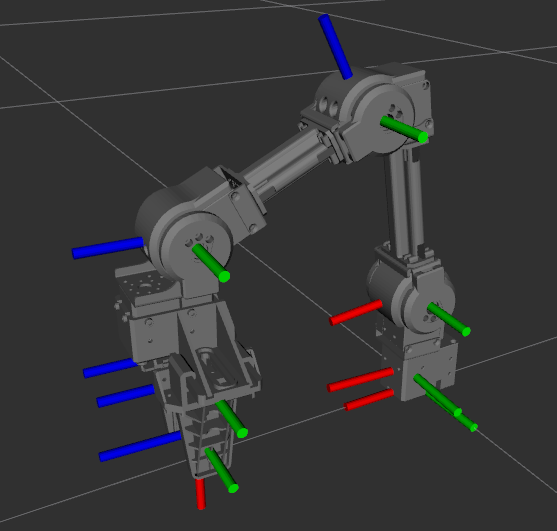
- 启动机械臂
$ ros2 launch open_manipulator_x_controller open_manipulator_x_controller.launch.py usb_port:=/dev/ttyACM0- 启动键盘控制
$ ros2 run open_manipulator_x_teleop teleop_keyboard

Control Your OpenManipulator!
---------------------------
Task Space Control:
         (Forward, X+)
              W                   Q (Upward, Z+)
(Left, Y+) A     D (Right, Y-)    Z (Downward, Z-)
              X
        (Backward, X-)

Joint Space Control:
- Joint1 : Increase (Y), Decrease (H)
- Joint2 : Increase (U), Decrease (J)
- Joint3 : Increase (I), Decrease (K)
- Joint4 : Increase (O), Decrease (L)
- Gripper: Increase (F), Decrease (G) | Fully Open (V), Fully Close (B)

INIT : (1)
HOME : (2)

CTRL-C to quit

Joint Angle(Rad): [0.081, 0.184, 0.212, 1.143, 0.010]
Kinematics Pose(Pose X, Y, Z | Orientation W, X, Y, Z): 0.000, 0.000, 0.000 | 0.000, 0.000, 0.000, 0.000- 启动可视化界面
$ ros2 launch open_manipulator_x_description open_manipulator_x_rviz.launch.py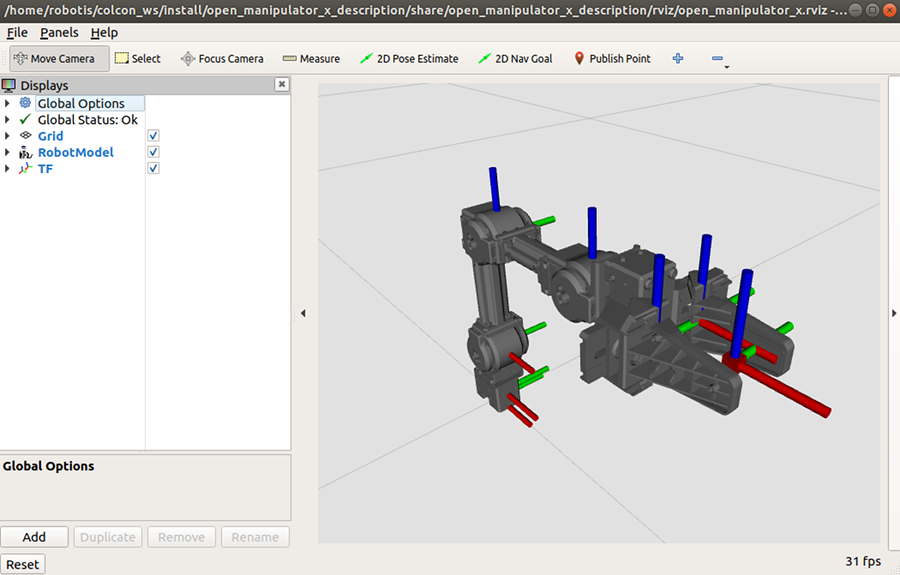
演示视频
<iframe height=498 width=100% src="//player.bilibili.com/player.html?aid=432352274&bvid=BV1PG411w7ua&cid=881205108&page=1&as_wide=1&high_quality=1&danmaku=0" scrolling="no" border="0" frameborder="no" framespacing="0" allowfullscreen="true"> </iframe>纠错,疑问,交流: 请进入讨论区或 请点击进入页面,扫码加入微信群或Q群进行交流
获取最新文章: 扫一扫加入“创客智造”公众号