



















OpenManipulator-P机械臂入门教程-仿真操作
纠错,疑问,交流: 请进入讨论区或 请点击进入页面,扫码加入微信群或Q群进行交流
获取最新文章: 扫一扫加入“创客智造”公众号
说明
- 介绍在gazebo中进行OpenManipulator机械臂仿真
纯Gazebo仿真
- 启动机械臂的仿真程序,需要点击 ▶ 按钮进行启动.
roslaunch open_manipulator_p_gazebo open_manipulator_p_gazebo.launch- 效果图:
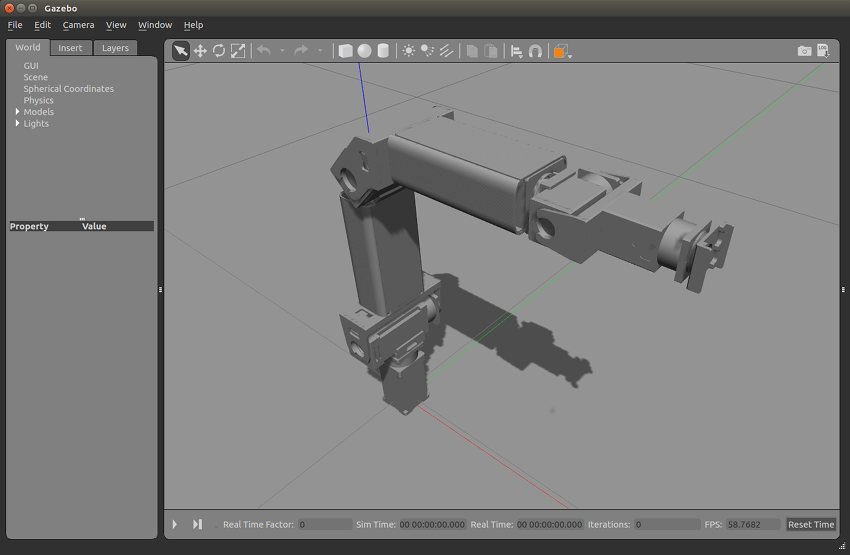
- 启动OpenManipulator机械臂控制
roslaunch open_manipulator_p_controller open_manipulator_p_controller.launch use_platform:=false- 启动效果
SUMMARY
========

PARAMETERS
 * /open_manipulator_p/control_period: 0.01
 * /open_manipulator_p/moveit_sample_duration: 0.05
 * /open_manipulator_p/planning_group_name: arm
 * /open_manipulator_p/using_moveit: False
 * /open_manipulator_p/using_platform: False
 * /rosdistro: kinetic
 * /rosversion: 1.12.14

NODES
  /
    open_manipulator_p (open_manipulator_p_controller/open_manipulator_p_controller)

ROS_MASTER_URI=http://192.168.3.149:11311

process[open_manipulator_p-1]: started with pid [4388]
[INFO] Ready to simulate /open_manipulator_p on Gazebo- 但若需要使用MoveIt!,可以在命令行后面添加
use_moveit:=true
GUI控制
- 启动命令
roslaunch open_manipulator_p_control_gui open_manipulator_p_control_gui.launch- 效果图:
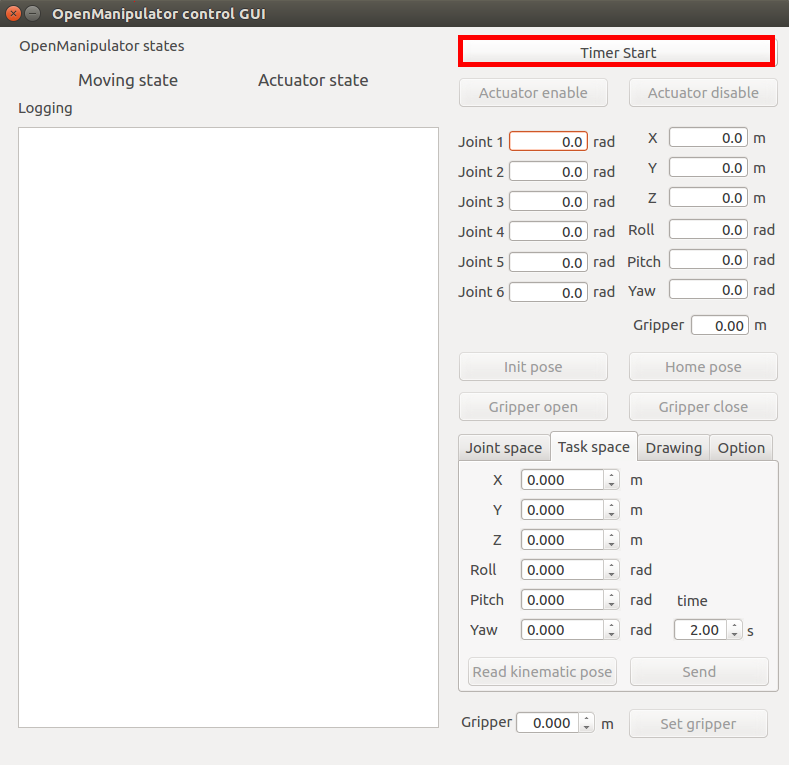
- 启动后,点击Timer Start,即可开始控制
键盘控制
- 启动命令
roslaunch open_manipulator_p_teleop open_manipulator_p_teleop_keyboard.launch- 效果图如下
---------------------------------
Control Your OpenManipulator-PRO!
---------------------------------
w : increase x axis in task space
s : decrease x axis in task space
a : increase y axis in task space
d : decrease y axis in task space
z : increase z axis in task space
x : decrease z axis in task space

r : increase joint 1 angle
f : decrease joint 1 angle
t : increase joint 2 angle
g : decrease joint 2 angle
y : increase joint 3 angle
h : decrease joint 3 angle
u : increase joint 4 angle
j : decrease joint 4 angle
i : increase joint 5 angle
k : decrease joint 5 angle
o : increase joint 6 angle
l : decrease joint 6 angle
v : gripper open
b : gripper close

1 : init pose
2 : home pose

q to quit
-------------------------------------------------------------------------------
Present Joint Angle J1: 0.000 J2: 0.000 J3: 0.000 J4: 0.000 J5: 0.000 J6: 0.000
Present Kinematics Position X: 0.000 Y: 0.000 Z: 0.000
-------------------------------------------------------------------------------
演示视频
<iframe height=498 width=100% src="//player.bilibili.com/player.html?aid=782988074&bvid=BV1E24y1F7EB&cid=1109705494&page=1" scrolling="no" border="0" frameborder="no" framespacing="0" allowfullscreen="true"> </iframe>gazebo + moveit仿真
- 启动命令
roslaunch open_manipulator_p_controllers joint_trajectory_controller.launch- 这个命令别人启动gazebo + 机械臂控制 + move_group + rviz
- 在启动gazebo仿真后,需要点击 ▶ 按钮进行启动,要不movegroup不能正常运行,rviz也不能正常打开
- gazebo效果图
- rviz效果图
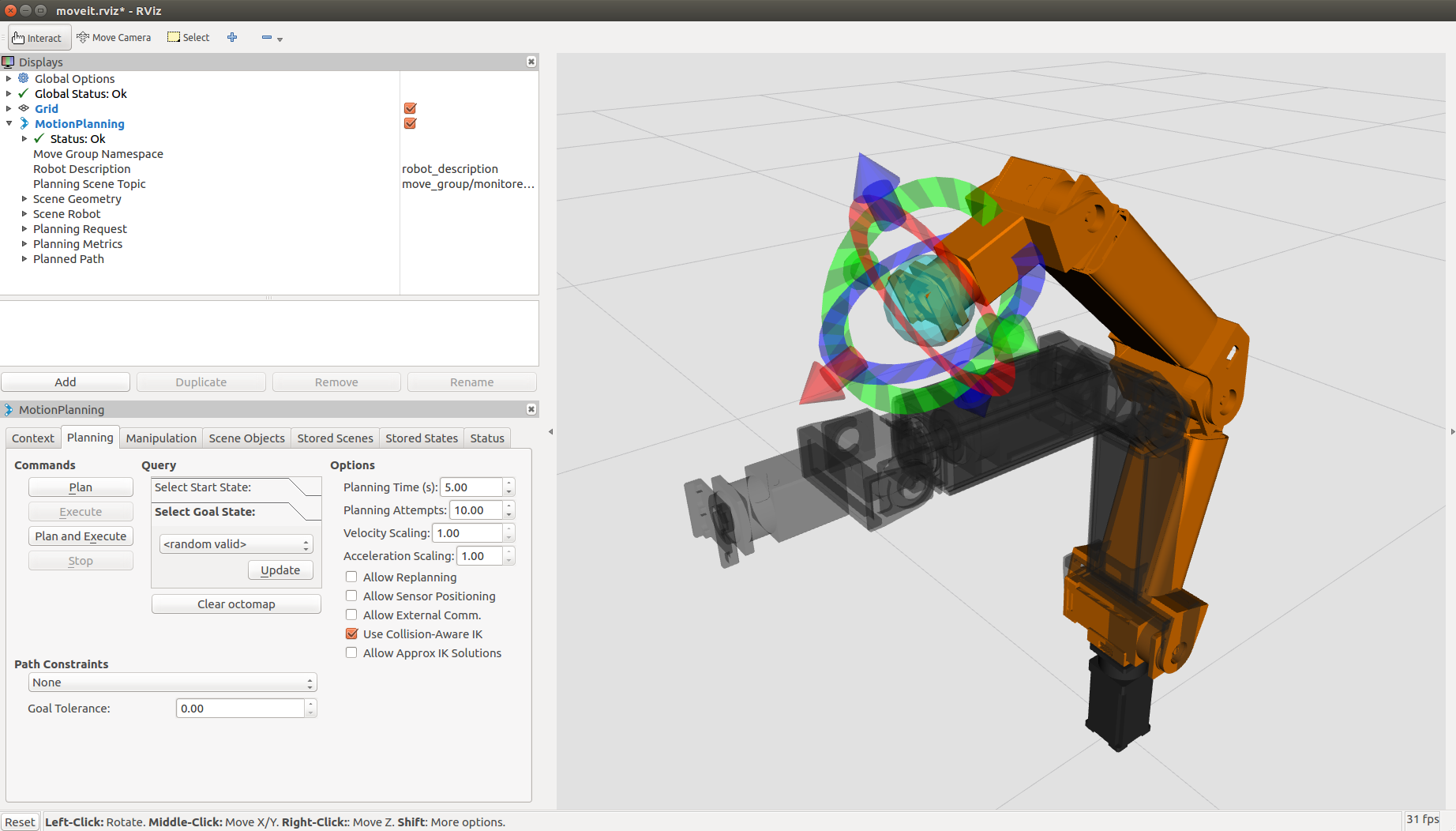
- 在rviz上在不同方向拖动箭头,再点击Plan and execute来执行
- gazebo上的机械臂和rviz的模型动作就会同步执行,移动到新的位置
演示视频
<iframe height=498 width=100% src="//player.bilibili.com/player.html?aid=227975163&bvid=BV1jh4117751&cid=1109703399&page=1" scrolling="no" border="0" frameborder="no" framespacing="0" allowfullscreen="true"> </iframe>纠错,疑问,交流: 请进入讨论区或 请点击进入页面,扫码加入微信群或Q群进行交流
获取最新文章: 扫一扫加入“创客智造”公众号