



















智能台灯LeLamp快速入门教程-软件安装

文章说明
- 本教程主要介绍如何进行安装lelamp对应的软件
相关设备
- LeLamp套件: 采购地址
操作步骤
安装需要用到的软件
- 安装vim和git
$ sudo apt install vim git安装UV
- 安装uv
$ curl -LsSf https://astral.sh/uv/install.sh | sh
$ source ~/.bashrc- 查看是否成功安装
$ which uv
/home/raspios/.local/bin/uv- 添加
/home/raspios/.local/bin/uv路径到配置文件中,让用户级安装的UV工具可以直接作为命令使用,
$ sudo visudo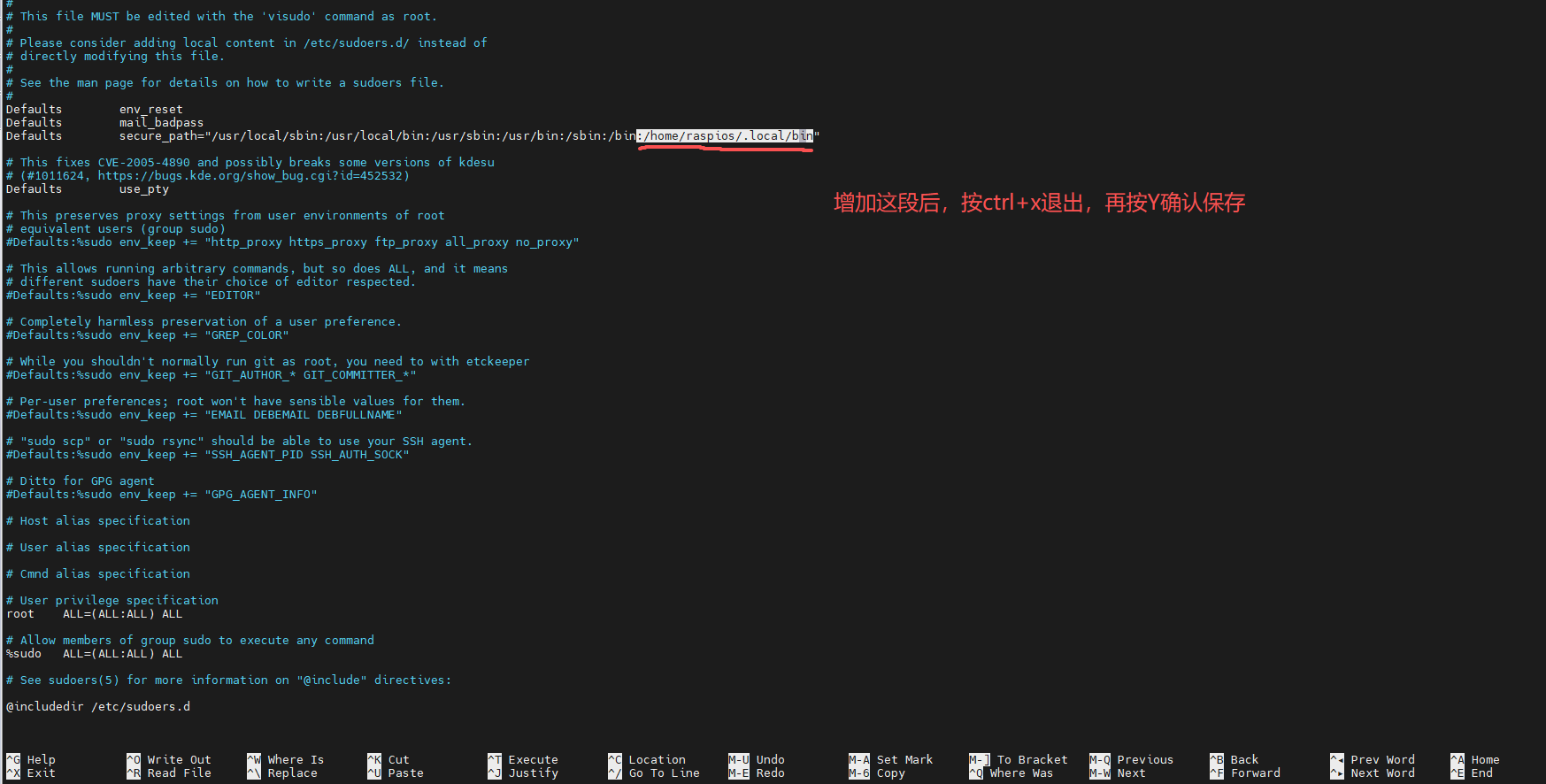
安装lelamp相关
- 安装audio相关依赖
$ sudo apt-get install portaudio19-dev$ mkdir ~/lelamp_ws
$ cd ~/lelamp_ws
$ git clone https://github.com/humancomputerlab/LeLamp
$ git clone https://github.com/humancomputerlab/lelamp_runtime.git
$ cd ~/lelamp_ws/lelamp_runtime
$ uv sync
Using CPython 3.12.12
Creating virtual environment at: .venv
Resolved 172 packages in 51ms
Updated https://github.com/huggingface/lerobot (55198de096f46a8e0447a8795129dd9ee84c088
Built feetech-servo-sdk==1.0.0
Built pyaudio==0.2.14
Built rpi-ws281x==5.0.0
Built evdev==1.9.2
Built sysv-ipc==1.1.0
Built lerobot @ git+https://github.com/huggingface/lerobot@55198de096f46a8e0447a87951
Prepared 150 packages in 3m 04s
Installed 150 packages in 5.55s
+ adafruit-blinka==8.62.0
+ adafruit-circuitpython-busdevice==5.2.13
+ adafruit-circuitpython-connectionmanager==3.1.5
+ adafruit-circuitpython-neopixel==6.3.17
+ adafruit-circuitpython-pixelbuf==2.0.9
+ adafruit-circuitpython-requests==4.1.13
+ adafruit-circuitpython-typing==1.12.1
+ adafruit-platformdetect==3.81.0
+ adafruit-pureio==1.1.11
+ aiofiles==24.1.0
+ aiohappyeyeballs==2.6.1
+ aiohttp==3.12.15
+ aiosignal==1.4.0
+ annotated-types==0.7.0
+ anyio==4.10.0
+ attrs==25.3.0
+ av==15.0.0
+ binho-host-adapter==0.1.6
+ blinker==1.9.0
+ certifi==2025.8.3
+ cffi==1.17.1
+ charset-normalizer==3.4.3
+ click==8.2.1
+ cloudpickle==3.1.1
+ cmake==4.1.0
+ colorama==0.4.6
+ datasets==3.6.0
+ deepdiff==8.6.0
+ diffusers==0.34.0
+ dill==0.3.8
+ distro==1.9.0
+ docstring-parser==0.17.0
+ draccus==0.10.0
+ einops==0.8.1
+ eval-type-backport==0.2.2
+ evdev==1.9.2
+ farama-notifications==0.0.4
+ feetech-servo-sdk==1.0.0
+ filelock==3.18.0
+ flask==3.1.1
+ frozenlist==1.7.0
+ fsspec==2025.3.0
+ gitdb==4.0.12
+ gitpython==3.1.45
+ googleapis-common-protos==1.70.0
+ grpcio==1.74.0
+ gymnasium==0.29.1
+ h11==0.16.0
+ hf-transfer==0.1.9
+ hf-xet==1.1.7
+ httpcore==1.0.9
+ httpx==0.28.1
+ huggingface-hub==0.34.4
+ idna==3.10
+ imageio==2.37.0
+ imageio-ffmpeg==0.6.0
+ importlib-metadata==8.7.0
+ inquirerpy==0.3.4
+ itsdangerous==2.2.0
+ jinja2==3.1.6
+ jiter==0.10.0
+ jsonlines==4.0.0
+ lerobot==0.3.4 (from git+https://github.com/huggingface/lerobot@55198de096f46a8e0447a8795129dd9ee84c088c)
+ livekit==1.0.12
+ livekit-agents==1.2.5
+ livekit-api==1.0.5
+ livekit-blingfire==1.0.0
+ livekit-plugins-noise-cancellation==0.2.5
+ livekit-plugins-openai==1.2.5
+ livekit-protocol==1.0.5
+ markupsafe==3.0.2
+ mergedeep==1.3.4
+ mpmath==1.3.0
+ multidict==6.6.4
+ multiprocess==0.70.16
+ mypy-extensions==1.1.0
+ nest-asyncio==1.6.0
+ networkx==3.5
+ numpy==2.2.6
+ openai==1.99.9
+ opencv-python-headless==4.12.0.88
+ opentelemetry-api==1.36.0
+ opentelemetry-exporter-otlp==1.36.0
+ opentelemetry-exporter-otlp-proto-common==1.36.0
+ opentelemetry-exporter-otlp-proto-grpc==1.36.0
+ opentelemetry-exporter-otlp-proto-http==1.36.0
+ opentelemetry-proto==1.36.0
+ opentelemetry-sdk==1.36.0
+ opentelemetry-semantic-conventions==0.57b0
+ orderly-set==5.5.0
+ packaging==25.0
+ pandas==2.3.1
+ pfzy==0.3.4
+ pillow==11.3.0
+ platformdirs==4.3.8
+ prometheus-client==0.22.1
+ prompt-toolkit==3.0.51
+ propcache==0.3.2
+ protobuf==6.31.1
+ psutil==7.0.0
+ pvporcupine==3.0.5
+ pvrecorder==1.2.7
+ pyarrow==20.0.0
+ pyaudio==0.2.14
+ pycparser==2.22
+ pydantic==2.11.7
+ pydantic-core==2.33.2
+ pyftdi==0.57.1
+ pyjwt==2.10.1
+ pynput==1.8.1
+ pyserial==3.5
+ python-dateutil==2.9.0.post0
+ python-dotenv==1.1.1
+ python-xlib==0.33
+ pytz==2025.2
+ pyusb==1.3.1
+ pyyaml==6.0.2
+ pyyaml-include==1.4.1
+ regex==2025.7.34
+ requests==2.32.4
+ rerun-sdk==0.22.1
+ rpi-ws281x==5.0.0
+ safetensors==0.6.2
+ sentry-sdk==2.34.1
+ setuptools==80.9.0
+ six==1.17.0
+ smmap==5.0.2
+ sniffio==1.3.1
+ sounddevice==0.5.2
+ sympy==1.14.0
+ sysv-ipc==1.1.0
+ termcolor==3.1.0
+ toml==0.10.2
+ torch==2.7.1
+ torchvision==0.22.1
+ tqdm==4.67.1
+ types-protobuf==4.25.0.20240417
+ typing-extensions==4.14.1
+ typing-inspect==0.9.0
+ typing-inspection==0.4.1
+ tzdata==2025.2
+ urllib3==2.5.0
+ wandb==0.21.1
+ watchfiles==1.1.0
+ wcwidth==0.2.13
+ websockets==15.0.1
+ werkzeug==3.1.3
+ xxhash==3.5.0
+ yarl==1.20.1
+ zipp==3.23.0如果是在电脑上安装的话,则使用以下安装命令
$ uv sync配置ReSpeaker Hat相关
- 下载设备的overlay源码,再加载overlay到内核里
$ curl https://raw.githubusercontent.com/Seeed-Studio/seeed-linux-dtoverlays/refs/heads/master/overlays/rpi/respeaker-2mic-v2_0-overlay.dts -o respeaker-2mic-v2_0-overlay.dts
$ dtc -I dts respeaker-2mic-v2_0-overlay.dts -o respeaker-2mic-v2_0-overlay.dtbo
$ sudo dtoverlay respeaker-2mic-v2_0-overlay.dtbo
$ sudo cp respeaker-2mic-v2_0-overlay.dtbo /boot/firmware/overlays- 设置开机自动加载
echo "dtoverlay=respeaker-2mic-v2_0-overlay" | sudo tee -a /boot/firmware/config.txt
echo "dtoverlay=i2s-mmap" | sudo tee -a /boot/firmware/config.txt- 设置系统默认的播放和录音设备
$ sudo tee /etc/asound.conf > /dev/null <<'EOF'
# Default capture & playback device = Seeed 2-Mic
pcm.!default {
    type plug
    slave {
        pcm "hw:3,0"      # input/output device (Seeed 2-Mic)
    }
}

ctl.!default {
    type hw
    card 3
}
EOF- 重启设备
$ sudo reboot