



















智能台灯LeLamp快速入门教程-舵机限位校准与测试

文章说明
- 本教程主要说明介绍如何进行舵机限位校准和测试
相关设备
- LeLamp套件: 采购地址
操作步骤
舵机限位校准
- 装配完整个舵机结构之后,就可以设置舵机的限位校准
your_lamp_name为当前自己定义的设备名称,the_port_found_in_previous_step为当前驱动板的端口
$ uv run -m lelamp.calibrate --id your_lamp_name --port the_port_found_in_previous_step- lelamp零位位置zero position
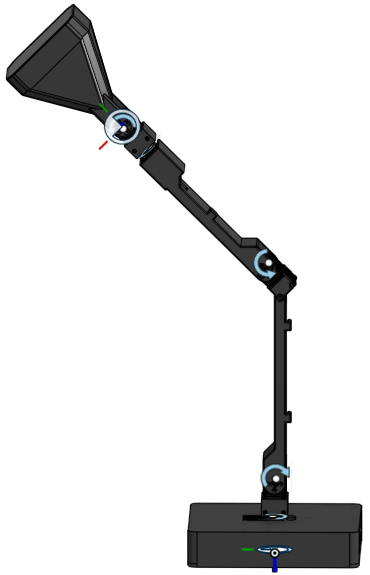
- 启动程序,会进行两次校准,第一次针对lelamp_follower,第二次针对lelamp_leader。按
C键,和按Enter键,开始校准。逐一转动舵机,确定舵机的左右方向的限位,在终端输出上可以看到具体数值,最大最小值和开始时的位置
$ cd ~/lelamp_ws/lelamp_runtime
$ uv run -m lelamp.calibrate --id lelamp1 --port /dev/ttyACM0

==================================================
FOLLOWER CALIBRATION
==================================================
INFO:__main__:Starting follower calibration for lamp ID: lelamp1 on port: /dev/ttyACM0
INFO:lelamp.follower.lelamp_follower:lelamp1 LeLampFollower connected.
Press ENTER to use provided calibration file associated with the id lelamp1, or type 'c' and press ENTER to run calibration: c
INFO:lelamp.follower.lelamp_follower:
Running calibration of lelamp1 LeLampFollower
Move lelamp1 LeLampFollower to the middle of its range of motion and press ENTER....
Move all joints sequentially through their entire ranges of motion.
Recording positions. Press ENTER to stop...

-------------------------------------------
-------------------------------------------
NAME            |    MIN |    POS |    MAX
base_yaw        |    933 |   1997 |   3452
base_pitch      |   1002 |   2088 |   3168
elbow_pitch     |    824 |   2003 |   3068
wrist_roll      |    951 |   2103 |   3269
wrist_pitch     |    832 |   1936 |   3242
Calibration saved to /home/raspios/.cache/huggingface/lerobot/calibration/robots/lelamp_follower/lelamp1.json
INFO:__main__:Follower calibration completed successfully
INFO:lelamp.follower.lelamp_follower:lelamp1 LeLampFollower disconnected.

==================================================
LEADER CALIBRATION
==================================================
INFO:__main__:Starting leader calibration for lamp ID: lelamp1 on port: /dev/ttyACM0
INFO:lelamp.leader.lelamp_leader:lelamp1 LeLampLeader connected.
Press ENTER to use provided calibration file associated with the id lelamp1, or type 'c' and press ENTER to run calibration: c
INFO:lelamp.leader.lelamp_leader:
Running calibration of lelamp1 LeLampLeader
Move lelamp1 LeLampLeader to the middle of its range of motion and press ENTER....
Move all joints sequentially through their entire ranges of motion.
Recording positions. Press ENTER to stop...

-------------------------------------------
NAME            |    MIN |    POS |    MAX
base_yaw        |    678 |   1950 |   2915
base_pitch      |   1033 |   1962 |   2933
elbow_pitch     |    762 |   3101 |   3111
wrist_roll      |    810 |   1976 |   3243
wrist_pitch     |    983 |   1977 |   3329
wrist_pitch     |    983 |   1977 |   3329
Calibration saved to /home/raspios/.cache/huggingface/lerobot/calibration/teleoperators/lelamp_leader/lelamp1.json
INFO:__main__:Leader calibration completed successfully
INFO:lelamp.leader.lelamp_leader:lelamp1 LeLampLeader disconnected.

==================================================
CALIBRATION COMPLETED SUCCESSFULLY
==================================================- 校准完成好,校准文件会保存在目录
/home/raspios/.cache/huggingface/lerobot/calibration/robots/lelamp_follower/lelamp1.json和/home/raspios/.cache/huggingface/lerobot/calibration/teleoperators/lelamp_leader/lelamp1.json下
舵机测试
- 舵机测试的命令例程
$ uv run -m lelamp.test.test_motors --id your_lamp_name --port port_your_servo_driver_is_connected_to-
your_lamp_name为当前自己定义的设备名称,the_port_found_in_previous_step为当前驱动板的端口 -
舵机运行测试程序之后,舵机会转动你到你设置的限位值,然后解除扭矩控制
$ cd ~/lelamp_ws/lelamp_runtime
$ uv run -m lelamp.test.test_motors --id lelamp1 --port /dev/ttyACM0
Testing Motors Service...
Getting available recordings...
Available recordings: ['curious', 'excited', 'happy_wiggle', 'headshake', 'idle', 'nod', 'sad', 'scanning', 'shock', 'shy', 'wake_up']
Playing first recording: curious
Playback completed!
Motors Service test completed!
演示视频一
<iframe height=498 width=100% src="//player.bilibili.com/player.html?isOutside=true&aid=116617337963096&bvid=BV1QzGt6YECo&cid=38525273523&p=1" scrolling="no" border="0" frameborder="no" framespacing="0" allowfullscreen="true"> </iframe>演示视频二
<iframe height=498 width=100% src="//player.bilibili.com/player.html?isOutside=true&aid=116617354675239&bvid=BV1pdGt6QEds&cid=38525403653&p=1" scrolling="no" border="0" frameborder="no" framespacing="0" allowfullscreen="true"> </iframe>