




智能台灯LeLampX快速入门教程-舵机限位校准与测试(终端)

文章说明
- 本教程主要说明介绍如何进行舵机限位校准和测试
- LeLamp2终端新校准与LeLamp1保持一致,但LeLamp2提供更加便利的web校准方法
- 对于采购整机的,已经都做好校准,可以直接使用。
相关设备
- LeLamp2套件: 采购地址
操作步骤
舵机限位校准
- 装配完整个舵机结构之后,就可以设置舵机的限位校准
your_lamp_name为当前自己定义的设备名称,the_port_found_in_previous_step为当前驱动板的端口
$ uv run -m lelamp.calibrate --id your_lamp_name --port the_port_found_in_previous_step- lelamp零位位置zero position
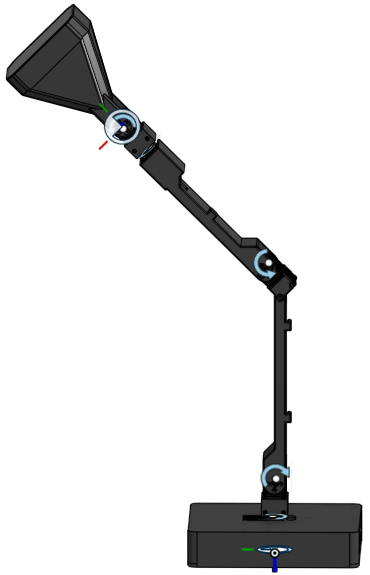
- 启动程序进行校准
$ cd ~/lelampv2
$ uv run python -m lelamp.calibrate --port /dev/lelamp

========================================================
LeLamp 舵机校准(CLI 交互版,与网页端一致)
========================================================
校准前请先停止服务,避免串口争用:
    sudo systemctl stop lelamp.service
已停止服务(或确认串口空闲)? [y/N]: y

无现有校准文件(首次校准),将从零开始

连接舵机总线...
总线已连接,全部关节设为 POSITION 模式

释放力矩(逐关节)...
    释放 elbow_pitch
    释放 wrist_pitch
    释放 wrist_roll
    释放 base_pitch
    释放 base_yaw
全部关节已释放,手臂可自由推动

========================================================
步骤 1/3:定义 Home(各关节机械中位)
========================================================
请手动把 5 个关节摆到『中位』姿态:
  base_yaw(1) 中位 / base_pitch(2) 中位 / elbow_pitch(3) 中位
  wrist_roll(4) 中位 / wrist_pitch(5) 中位
摆好所有关节后按 Enter 记录 Home...
Home 已记录(Homing_Offset): {'base_yaw': 171, 'base_pitch': -4, 'elbow_pitch': 131, 'wrist_roll': -7, 'wrist_pitch': 11}

========================================================
步骤 2/3:记录各关节行程范围
========================================================

—— 关节 base_yaw ——
  把 base_yaw 掰到『一端』极限位置,按 Enter 记录...
  把 base_yaw 掰到『另一端』极限位置,按 Enter 记录...
  ✓ base_yaw: [1018, 3055]

—— 关节 base_pitch ——
  把 base_pitch 掰到『一端』极限位置,按 Enter 记录...
  把 base_pitch 掰到『另一端』极限位置,按 Enter 记录...
  ✓ base_pitch: [1070, 3036]

—— 关节 elbow_pitch ——
  把 elbow_pitch 掰到『一端』极限位置,按 Enter 记录...
  把 elbow_pitch 掰到『另一端』极限位置,按 Enter 记录...
  ✓ elbow_pitch: [962, 3143]

—— 关节 wrist_roll ——
  把 wrist_roll 掰到『一端』极限位置,按 Enter 记录...
  把 wrist_roll 掰到『另一端』极限位置,按 Enter 记录...
  ✓ wrist_roll: [1073, 3066]

—— 关节 wrist_pitch ——
  把 wrist_pitch 掰到『一端』极限位置,按 Enter 记录...
  把 wrist_pitch 掰到『另一端』极限位置,按 Enter 记录...
  ✓ wrist_pitch: [1071, 3049]

========================================================
步骤 3/3:数据自检并保存
========================================================
数据自检通过
校准已保存: /home/lelamp/.lelamp/calibration/lelamp.json
home.csv 已写入(home 姿态 ['-2.01', '-48.12', '100.00', '-100.00', '-100.00'])

========================================================
校准完成!
========================================================
  下一步:
    sudo systemctl start lelamp.service
    验证: python3 scripts/watch_motors.py  或网页点 home/视觉位
    方向确认(可选): 网页 setup 向导『方向确认』步骤可随时补充

Config saved to /home/lelamp/.lelamp/config.yaml with port /dev/lelamp
舵机测试
- 舵机测试的命令例程
$ uv run -m lelamp.test.test_motors --id your_lamp_name --port port_your_servo_driver_is_connected_to-
your_lamp_name为当前自己定义的设备名称,the_port_found_in_previous_step为当前驱动板的端口 -
舵机运行测试程序之后,舵机会转动你到你设置的限位值,然后解除扭矩控制
$ uv run python -m lelamp.test.test_motors --port /dev/lelamp
播放: test_motors(复用 replay 引擎,逐帧 1:1,smooth=False)
Replaying 552 actions from /home/lelamp/lelampv2/lelamp/recordings/test_motors.csv
Finished replaying recording
播放完成!舵机链路正常(若舵机无动作,请检查校准/力矩/串口)
Disconnected
单独控制舵机
- 舵机的中位位置是2048,通常是正负90度之间。1024是负90度,3072是正90度位置
-motor-id可以指定对应的号数的舵机,默认是1号舵机- 测试命令,回到中位:
python3 -m lelamp.motor_utils raw-move --motor-id 1 --raw 2048- 测试命令,回到-90度:
python3 -m lelamp.motor_utils raw-move --motor-id 1 --raw 1024- 测试命令,回到+90度:
python3 -m lelamp.motor_utils raw-move --motor-id 1 --raw 3072演示视频一
<iframe height=498 width=100% src="//player.bilibili.com/player.html?isOutside=true&aid=117206184626933&bvid=BV1iHtR69Ekr&cid=41546941742&p=1" scrolling="no" border="0" frameborder="no" framespacing="0" allowfullscreen="true"> </iframe>演示视频二
<iframe height=498 width=100% src="//player.bilibili.com/player.html?isOutside=true&aid=116617354675239&bvid=BV1pdGt6QEds&cid=38525403653&p=1" scrolling="no" border="0" frameborder="no" framespacing="0" allowfullscreen="true"> </iframe>