



















AlohaMini入门教程-测试-控制升降台 机械臂和底盘
纠错,疑问,交流: 请进入讨论区或 请点击进入页面,扫码加入微信群或Q群进行交流
获取最新文章: 扫一扫加入“创客智造”公众号
说明:
- 介绍如何控制机械臂,底盘和升降台
步骤:
从臂部分:
- 添加权限
sudo chmod 777 /dev/ttyACM*- 激活环境
conda activate lerobot_alohamini- 执行控制语句
python -m lerobot.robots.alohamini.lekiwi_host- 结果如下
Press ENTER to use provided calibration file associated with the id AlohaMiniRobot, or type 'c' and press ENTER to run calibration:
[lift_axis.home] Present_Current=26.0 mA
[lift_axis.home] Present_Position=3848.0 ticks
[lift_axis.home] Stalled at current=26.0 mA, moved=False
[lift_axis.home] Present_Current=104.0 mA
[lift_axis.home] Present_Position=3873.0 ticks
[lift_axis.home] Present_Current=279.5 mA
[lift_axis.home] Present_Position=3917.0 ticks
[lift_axis.home] Stalled at current=279.5 mA, moved=True
[lift_axis.home] Present_Current=877.5 mA
[lift_axis.home] Present_Position=3953.0 ticks
[lift_axis.home] Stalled at current=877.5 mA, moved=True
Disable torque output (motor will be released)
Extended ticks after homing: -1.0
[home] set-zero z0_deg=0.09, height_now=0.00 mm
Lift axis homed to 0mm.
WARNING:root:No command available
Left Bus currents: {0,0,0,0,0,0,0,0,0,0}
Right Bus currents: {0,0,0,0,0,0}
WARNING:root:No command available
Left Bus currents: {0,0,0,0,0,0,0,0,0,0}
Right Bus currents: {0,0,0,0,0,0}
WARNING:root:No command available
Left Bus currents: {0,0,0,0,0,0,0,0,0,0}
Right Bus currents: {0,0,0,0,0,0}
WARNING:root:No command available
Left Bus currents: {0,0,0,0,0,0,0,0,0,0}
Right Bus currents: {0,0,0,0,0,0}
主臂部分:
- 执行控制语句,remote_ip为树莓派的ip地址
python examples/alohamini/teleoperate_bi.py --remote_ip 192.168.0.42 --leader_id so101_leader_bi- 分别按 w 、a 、s 、z 、x 、r、f键进行控制机器人
- 向前: w
 - 向后: s
 - 向左: a
 - 向右: d
 - 左转: z
 - 右转: x

 - 增加速度: r
- 减低速度: f- 分别按u、j、q键进行控制升降台Z轴
- 升降台向上: u
- 升降台向下: j
- 退出: q- 结果如下
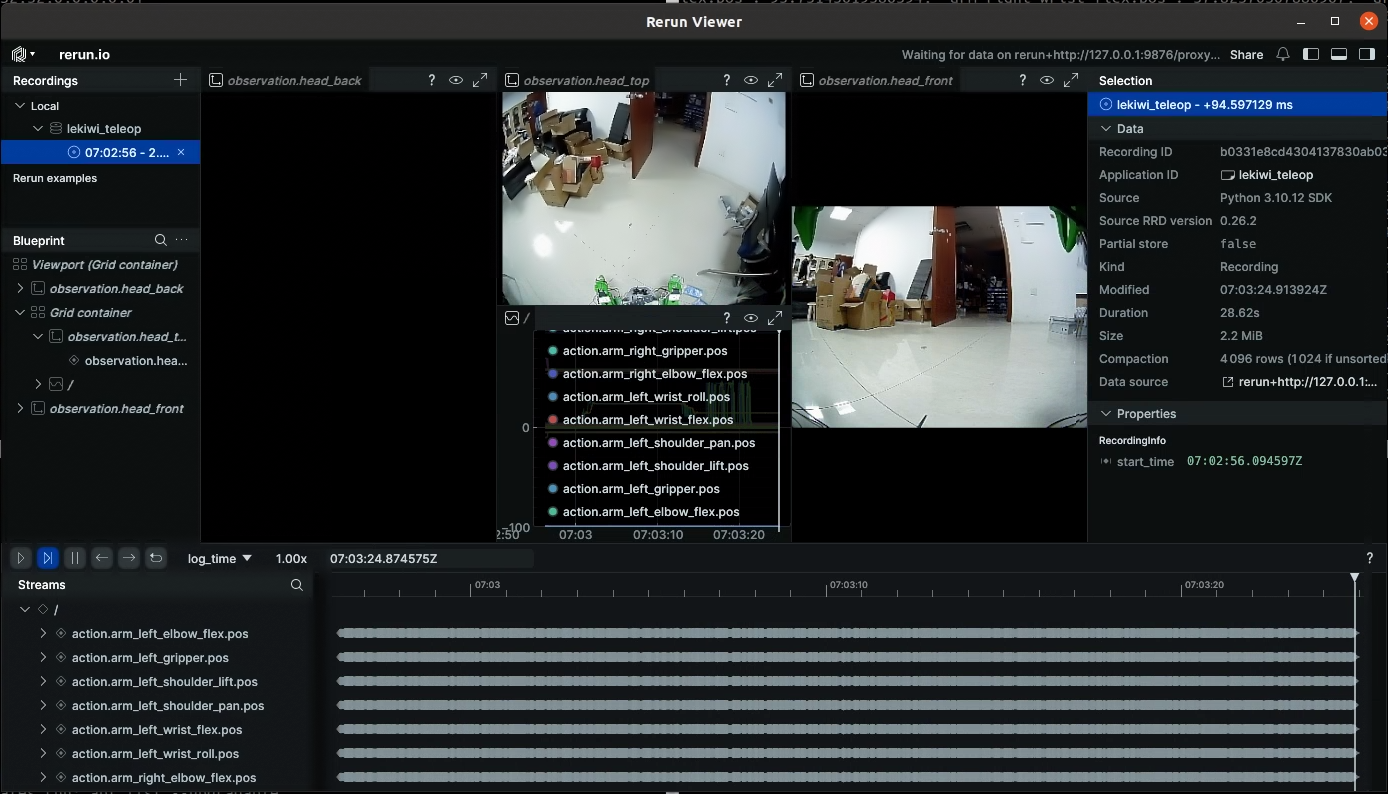
Sent action → {'arm_left_shoulder_pan.pos': -3.8856304985337147, 'arm_left_shoulder_lift.pos': -100.0, 'arm_left_elbow_flex.pos': 98.73360470375397, 'arm_left_wrist_flex.pos': 54.58440445586976, 'arm_left_wrist_roll.pos': 5.054945054945065, 'arm_left_gripper.pos': 2.8146989835809224, 'arm_right_shoulder_pan.pos': -4.287284719677544, 'arm_right_shoulder_lift.pos': -99.74369927381461, 'arm_right_elbow_flex.pos': 95.73143619386394, 'arm_right_wrist_flex.pos': 57.82370307886967, 'arm_right_wrist_roll.pos': 4.224664224664238, 'arm_right_gripper.pos': 1.7490494296577948, 'x.vel': 0.0, 'y.vel': 0.0, 'theta.vel': 0.0, 'lift_axis.height_mm': 15.0732421875}- 弹出rerun viewer相机界面
纠错,疑问,交流: 请进入讨论区或 请点击进入页面,扫码加入微信群或Q群进行交流
获取最新文章: 扫一扫加入“创客智造”公众号