



















BlueROV2入门教程-QGroundControl配置(Mac)
纠错,疑问,交流: 请进入讨论区或 请点击进入页面,扫码加入微信群或Q群进行交流
获取最新文章: 扫一扫加入“创客智造”公众号
BlueROV2入门教程-QGroundControl配置(Mac)
说明:
- 本教程介绍BlueROV2水下机器人如何在Mac下QGroundControl
QGroundControl下载
网络设置
-
进入
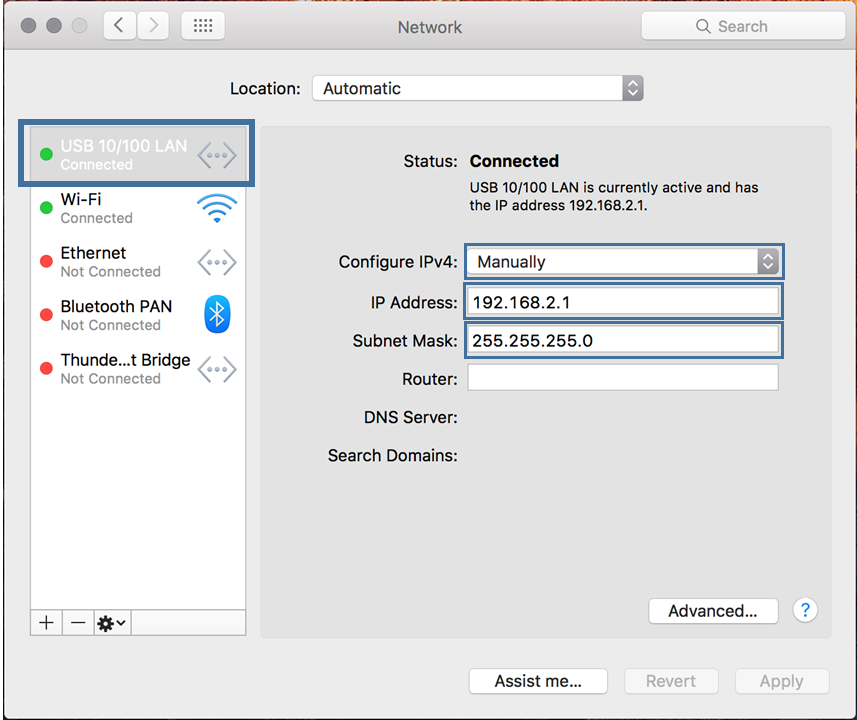
系统设置->网络 -
如果您的计算机具有以太网端口,请从左侧的选项中选择“以太网”。
-
选择“配置IPv4”旁边的下拉菜单,然后选择“手动”
-
输入192.168.2.1作为IP地址,输入255.255.255.0作为子网掩码,然后选择应用
测试与BlueROV2的连接
-
在BlueROV2仍然连接并打开电源的情况下,启动QGroundControl应用程序
-
等待几秒钟以使ROV自动连接,绿色参数栏从左到右完成加载。
-
连接成功后,在QGroundControl应用程序中显示视频流和遥测信息
-
如果连接不上,请参考ArduSub Troubleshooting Guide找出问题,再者可以联系官方提供技术支持
纠错,疑问,交流: 请进入讨论区或 请点击进入页面,扫码加入微信群或Q群进行交流
获取最新文章: 扫一扫加入“创客智造”公众号