



















ROS2与Open-RMF仿真教程#Jazzy版#-安装free_fleet
纠错,疑问,交流: 请进入讨论区或 请点击进入页面,扫码加入微信群或Q群进行交流
获取最新文章: 扫一扫加入“创客智造”公众号
文章说明
- 本教程主要介绍如何安装free_fleet
- 测试环境:
Ubuntu 24.04+ROS2 Jazzy
Free fleet概述
Free Fleet是Open-RMF生态中的一个关键组件,它是一个开源的通用车队管理桥接层(fleet management bridge),用于将不同品牌、不同系统的机器人接入Open-RMF的统一调度与任务系统中
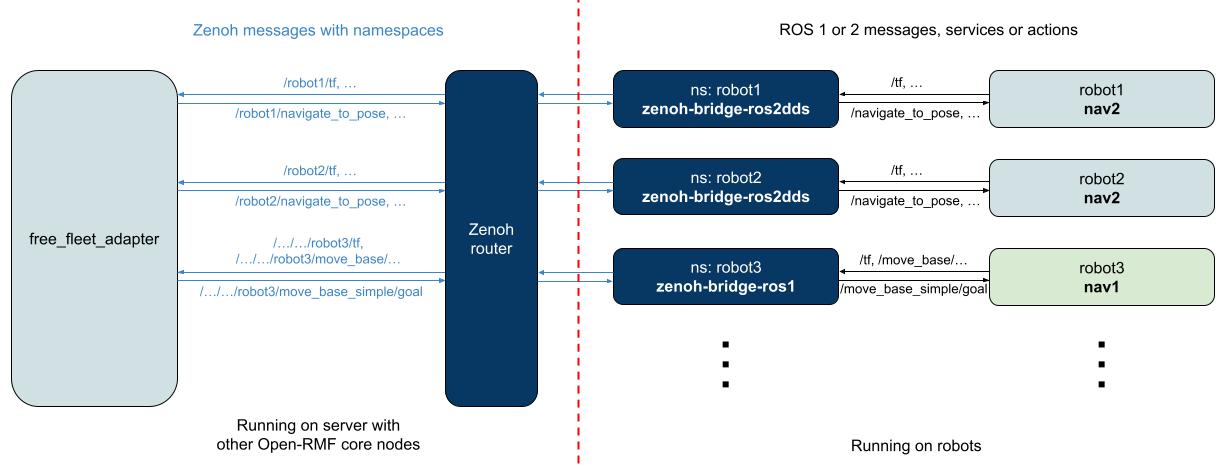
Free Fleet的主要任务是:在Open-RMF的调度系统与实际机器人导航系统(ROS/ROS 2)之间建立通信桥梁- 它让
RMF能够:
- 向机器人下发任务(如移动到某处、等待、充电等)
- 接收机器人状态(位置、电量、任务进度等)
- 在多机器人环境中协调路径与资源使用- 换句话说,
Free Fleet就是RMF的“车队翻译官”,它把RMF的调度指令“翻译”成机器人能理解的动作指令,又把机器人状态“翻译”回RMF`
安装步骤
- 安装相关依赖
$ sudo apt update && sudo apt install python3-pip ros-jazzy-rmw-cyclonedds-cpp- pip安装nudged、eclipse-zenoh、pycdr2、rosbags,这里可选择在
虚拟环境安装或者--break-system-packages方式直接安装
$ pip3 install nudged eclipse-zenoh==1.5.0 pycdr2 rosbags --break-system-packages- 安装Zenoh
$ curl -L https://download.eclipse.org/zenoh/debian-repo/zenoh-public-key | sudo gpg --dearmor --yes --output /etc/apt/keyrings/zenoh-public-key.gpg
$ echo "deb [signed-by=/etc/apt/keyrings/zenoh-public-key.gpg] https://download.eclipse.org/zenoh/debian-repo/ /" | sudo tee -a /etc/apt/sources.list > /dev/null
$ sudo apt update
$ sudo apt install zenoh- 安装free_fleet
$ mkdir -p ~/ros2_free_fleet_ws/src
$ cd ~/ros2_free_fleet_ws/src
$ git clone https://github.com/open-rmf/free_fleet

# Install dependencies
$ cd ~/ros2_free_fleet_ws
$ rosdep install --from-paths src --ignore-src --rosdistro $ROS_DISTRO -yr

# Build
$ colcon build --cmake-args -DCMAKE_BUILD_TYPE=Release- 下载和安装zenoh-bridge-ros2dds
# Download and extract zenoh-bridge-ros2dds release
$ wget -O zenoh-plugin-ros2dds.zip https://www.eclipse.org/downloads/download.php?file=/zenoh/zenoh-plugin-ros2dds/latest/zenoh-plugin-ros2dds-1.5.1-x86_64-unknown-linux-gnu-debian.zip

# If using released standalone binaries of zenoh router, download and extract the release
# wget -O zenoh.zip https://github.com/eclipse-zenoh/zenoh/releases/download/$ZENOH_VERSION/zenoh-$ZENOH_VERSION-x86_64-unknown-linux-gnu-standalone.zip
# unzip zenoh.zip
参考资料
纠错,疑问,交流: 请进入讨论区或 请点击进入页面,扫码加入微信群或Q群进行交流
获取最新文章: 扫一扫加入“创客智造”公众号