



















ROS2与Open-RMF仿真教程#Jazzy版#-安装Open-RMF
纠错,疑问,交流: 请进入讨论区或 请点击进入页面,扫码加入微信群或Q群进行交流
获取最新文章: 扫一扫加入“创客智造”公众号
文章说明
- 本教程主要介绍如何在ROS2 Jazzy下安装Open-RMF框架
- 测试环境:
Ubuntu 24.04+ROS2 Jazzy+Gazebo Harmonic 8.9.0 - 如需要在
docker下使用,请参阅官方文档
Open-RMF介绍
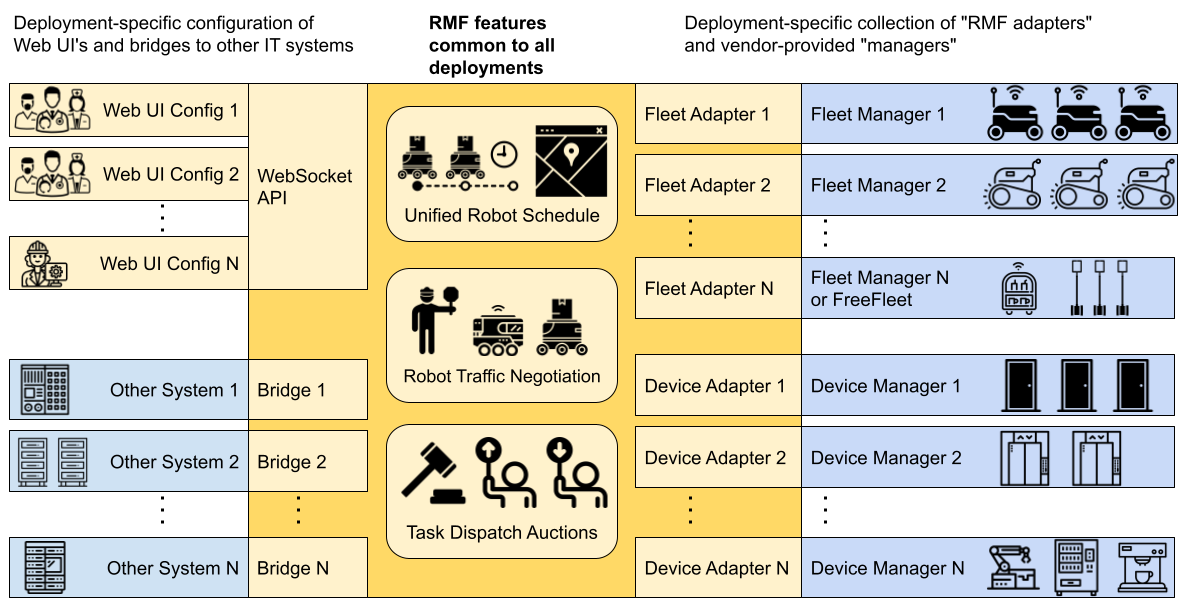
- Open-RMF是一个异构多智能体协同调度系统,用于协调不同机器人车队进行不同任务管理的可视化管理系统
操作步骤
由于使用apt安装会有可能出现某些场境示例不能正常启动,故推荐使用源码安装方式
RCM脚本一键安装
- RCM安装教程:ROS命令管理器-RCM使用入门(命令行版)
- 使用RCM脚本源码安装Open-RMF框架,具体脚本内容查看
$ rcm ros2_rmf install_rmf_jazzy_source源码分步安装
- 安装gazebo源
$ sudo apt update
$ sudo apt install -y wget
$ sudo sh -c 'echo "deb http://packages.osrfoundation.org/gazebo/ubuntu-stable lsb_release -cs main" > /etc/apt/sources.list.d/gazebo-stable.list'
$ wget https://packages.osrfoundation.org/gazebo.key -O - | sudo apt-key add -- 安装相关依赖
$ sudo apt update && sudo apt install \
  git cmake python3-vcstool curl \
  -y
$ python3 -m pip install flask-socketio fastapi uvicorn datamodel_code_generator asyncio
$ sudo apt-get install python3-colcon* -y
$ sudo apt-get install libyaml-dev -y
$ sudo apt install python3-flask-cors
$ sudo apt-get install libwebsocketpp-dev
$ sudo apt-get install ros-jazzy-ament-cmake-vendor-package
$ sudo apt purge python3-websockets
$ python3 -m pip install websockets==10.4
$ sudo apt install clang lldb lld- 创建目录
$ mkdir -p ~/ros2_rmf_ws/src
$ cd ~/ros2_rmf_ws- 生成reos文件
$ echo "repositories:
  rmf/rmf_battery:
    type: git
    url: https://github.com/open-rmf/rmf_battery.git
    version: jazzy
  rmf/rmf_internal_msgs:
    type: git
    url: https://github.com/open-rmf/rmf_internal_msgs.git
    version: jazzy
  rmf/rmf_api_msgs:
    type: git
    url: https://github.com/open-rmf/rmf_api_msgs.git
    version: jazzy
  rmf/rmf_ros2:
    type: git
    url: https://github.com/open-rmf/rmf_ros2.git
    version: jazzy
  rmf/rmf_task:
    type: git
    url: https://github.com/open-rmf/rmf_task.git
    version: jazzy
  rmf/rmf_traffic:
    type: git
    url: https://github.com/open-rmf/rmf_traffic.git
    version: jazzy
  rmf/rmf_utils:
    type: git
    url: https://github.com/open-rmf/rmf_utils.git
    version: jazzy
  rmf/ament_cmake_catch2:
    type: git
    url: https://github.com/open-rmf/ament_cmake_catch2.git
    version: jazzy
  rmf/rmf_visualization:
    type: git
    url: https://github.com/open-rmf/rmf_visualization.git
    version: jazzy
  rmf/rmf_visualization_msgs:
    type: git
    url: https://github.com/open-rmf/rmf_visualization_msgs.git
    version: jazzy
  rmf/rmf_building_map_msgs:
    type: git
    url: https://github.com/open-rmf/rmf_building_map_msgs.git
    version: jazzy
  rmf/rmf_simulation:
    type: git
    url: https://github.com/open-rmf/rmf_simulation.git
    version: jazzy
  rmf/rmf_traffic_editor:
    type: git
    url: https://github.com/open-rmf/rmf_traffic_editor.git
    version: jazzy
  demonstrations/rmf_demos:
    type: git
    url: https://github.com/open-rmf/rmf_demos.git
    version: jazzy
  thirdparty/menge_vendor:
    type: git
    url: https://github.com/open-rmf/menge_vendor.git
    version: jazzy
  thirdparty/nlohmann_json_schema_validator_vendor:
    type: git
    url: https://github.com/open-rmf/nlohmann_json_schema_validator_vendor.git
    version: jazzy
  thirdparty/pybind11_json_vendor:
    type: git
    url: https://github.com/open-rmf/pybind11_json_vendor.git
version: jazzy" > rmf.repos- 下载代码
$ vcs import src < rmf.repos- 自动安装依赖
$  cd ~/ros2_rmf_ws
$ rosdep install --from-paths src --ignore-src --rosdistro jazzy -y- 更新colon
$ colcon mixin add default https://raw.githubusercontent.com/colcon/colcon-mixin-repository/master/index.yaml
$ colcon mixin update default- 编译工作空间
$ source /opt/ros/jazzy/setup.bash
$ cd ~/ros2_rmf_ws
$ export CXX=clang++
$ export CC=clang
$ colcon build --mixin release lld- 添加环境配置文件到
~/bashrc
$ echo 'source ~/ros2_rmf_ws/install/setup.bash' >> ~/.bashrc
$ source ~/.bashrc
测试是否安装成功
- 新开终端,启动office场景示例
$ ros2 launch rmf_demos_gz office.launch.xml- 新开终端,运行传送任务
$ ros2 run rmf_demos_tasks dispatch_delivery -p pantry -ph coke_dispenser -d hardware_2 -dh coke_ingestor --use_sim_time
[INFO] [1755503758.679087095] [task_requester]: Using Sim Time
[INFO] [1755503758.682720955] [task_requester]: Using 'dispatch_task_request'
Json msg payload:
{
  "type": "dispatch_task_request",
  "request": {
    "unix_millis_request_time": 0,
    "unix_millis_earliest_start_time": 0,
    "requester": "rmf_demos_tasks",
    "category": "delivery",
    "description": {
      "pickup": {
        "place": "pantry",
        "handler": "coke_dispenser",
        "payload": []
      },
      "dropoff": {
        "place": "hardware_2",
        "handler": "coke_ingestor",
        "payload": []
      }
    }
  }
}
Got response:
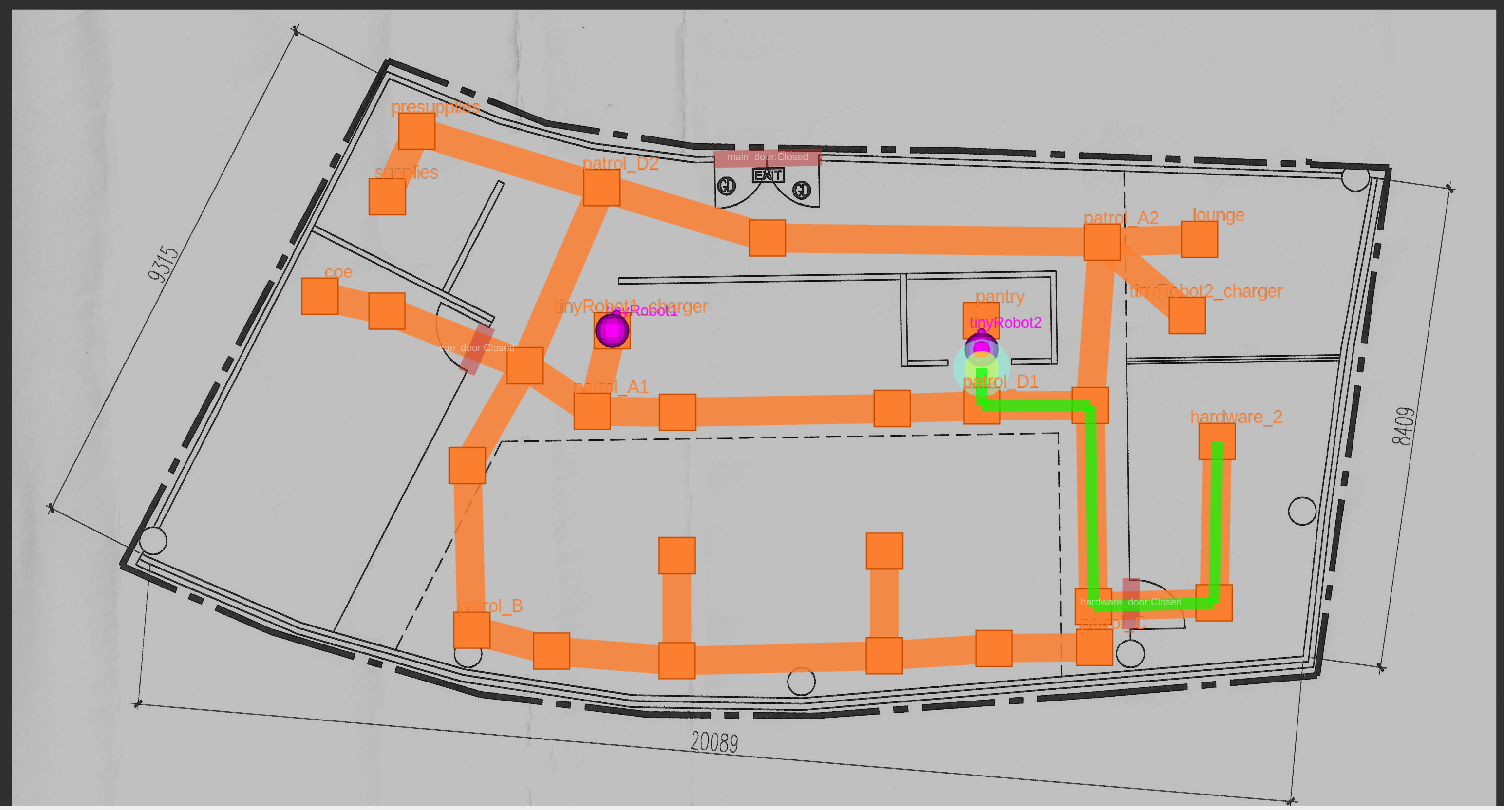
{'state': {'booking': {'id': 'delivery.dispatch-adcc670346', 'requester': 'rmf_demos_tasks', 'unix_millis_earliest_start_time': 0, 'unix_millis_request_time': 0}, 'category': 'delivery', 'detail': {'dropoff': {'handler': 'coke_ingestor', 'payload': [], 'place': 'hardware_2'}, 'pickup': {'handler': 'coke_dispenser', 'payload': [], 'place': 'pantry'}}, 'dispatch': {'errors': [], 'status': 'queued'}, 'status': 'queued', 'unix_millis_start_time': 0}, 'success': True}- 正常情况下,Rviz2中会显示系统生成的机器人的行走路线
纠错,疑问,交流: 请进入讨论区或 请点击进入页面,扫码加入微信群或Q群进行交流
获取最新文章: 扫一扫加入“创客智造”公众号