



















ROS2与Open-RMF仿真教程#Jazzy版#-安装rmf-web
纠错,疑问,交流: 请进入讨论区或 请点击进入页面,扫码加入微信群或Q群进行交流
获取最新文章: 扫一扫加入“创客智造”公众号
文章说明
- 本教程主要介绍如何安装rmf-web应用
- 测试环境:
Ubuntu 24.04+ROS2 Jazzy+Gazebo Harmonic 8.9.0 - 如需要在
docker下使用,请参阅官方文档
操作步骤
RCM脚本一键安装
- RCM安装教程:ROS命令管理器-RCM使用入门(命令行版)
- 使用RCM脚本源码安装Open-RMF框架,具体脚本内容查看
$ rcm ros2_rmf install_rmf_web_jazzy源码分步安装
- 安装依赖
$ sudo apt install python3-venv
$ pip3 install pipenv- 下载代码
$ cd ~/ros2_rmf_ws/src/
$ git clone -b jazzy https://github.com/open-rmf/rmf-web.git
$ sudo curl -fsSL https://get.pnpm.io/install.sh | bash -
$ pnpm env use --global 20- 安装
$ cd ~/ros2_rmf_ws/rmf-web
$ pnpm install
测试
- 检查是否正常安装成功
- 新开终端,加载office场景示例
$ ros2 launch rmf_demos_gz office.launch.xml server_uri:="ws://localhost:8000/_internal"- 新开终端,启动后端服务(API Server)
$ cd ~/ros2_rmf_ws/src/rmf-web/packages/api-server
$ pnpm start
> api-server@0.3.0 start /home/ubuntu/ros2_rmf_ws/src/rmf-web/packages/api-server
> rm -rf run && mkdir -p run/cache && RMF_API_SERVER_CONFIG=${RMF_API_SERVER_CONFIG:-sqlite_local_config.py} ../../.venv/bin/pipenv run python -m api_server

msg="loading states from database..." level="INFO" ts="2025-08-14T17:47:16.870+0800" src="app.py:260" funcName="_load_states"
msg="loaded 0 door states" level="INFO" ts="2025-08-14T17:47:16.872+0800" src="app.py:265" funcName="_load_states"
msg="loaded 0 lift states" level="INFO" ts="2025-08-14T17:47:16.873+0800" src="app.py:270" funcName="_load_states"
msg="loaded 0 dispenser states" level="INFO" ts="2025-08-14T17:47:16.874+0800" src="app.py:277" funcName="_load_states"
msg="loaded 0 ingestor states" level="INFO" ts="2025-08-14T17:47:16.875+0800" src="app.py:284" funcName="_load_states"
msg="starting scheduler" level="INFO" ts="2025-08-14T17:47:16.876+0800" src="app.py:118" funcName="lifespan"
msg="loaded 0 tasks" level="INFO" ts="2025-08-14T17:47:16.878+0800" src="app.py:136" funcName="lifespan"
msg="successfully started scheduler" level="INFO" ts="2025-08-14T17:47:16.878+0800" src="app.py:137" funcName="lifespan"
msg="started app" level="INFO" ts="2025-08-14T17:47:16.878+0800" src="app.py:139" funcName="lifespan"
[WARN] [1755164836.960466492] [rmf_api_server]: New publisher discovered on topic 'fire_alarm_trigger', offering incompatible QoS. No messages will be received from it. Last incompatible policy: DURABILITY
msg="saved new file \"/home/ubuntu/ros2_rmf_ws/src/rmf-web/packages/api-server/run/cache/hotel/L1-hotel_L1.6kbwyc76p2pay4xetomuawhwthwrr7uj.png\"" level="INFO" ts="2025-08-14T17:47:17.126+0800" src="cached_files.py:38" funcName="add_file"
msg="saved new file \"/home/ubuntu/ros2_rmf_ws/src/rmf-web/packages/api-server/run/cache/hotel/L2-hotel_L2.y5pdsqe3fr6ciknktenheimtgoyicuxq.png\"" level="INFO" ts="2025-08-14T17:47:17.127+0800" src="cached_files.py:38" funcName="add_file"
msg="saved new file \"/home/ubuntu/ros2_rmf_ws/src/rmf-web/packages/api-server/run/cache/hotel/L3-hotel_L3.6wqxwoog2x2jlko2d4vuuyo6xtu244nt.png\"" level="INFO" ts="2025-08-14T17:47:17.127+0800" src="cached_files.py:38" funcName="add_file"
msg="got response 'patrol_64662697-4934-4eb8-a681-b7aa8ed6d0ce'" level="INFO" ts="2025-08-14T17:47:17.138+0800" src="rmf_service.py:89" funcName="_handle_response"
msg="Received response for unknown request id: patrol_64662697-4934-4eb8-a681-b7aa8ed6d0ce" level="WARNING" ts="2025-08-14T17:47:17.138+0800" src="rmf_service.py:93" funcName="_handle_response"
msg="127.0.0.1:52186 - \"GET /socket.io/?EIO=4&transport=polling&t=PYd-Wlz HTTP/1.1\" 200" level="INFO" ts="2025-08-14T17:47:18.914+0800" src="httptools_impl.py:481" funcName="send"
msg="127.0.0.1:52186 - \"GET /socket.io/?EIO=4&transport=polling&t=PYd-Wm7&sid=bW7kNqK4bJyJTUDlAAAA HTTP/1.1\" 200" level="INFO" ts="2025-08-14T17:47:18.930+0800" src="httptools_impl.py:481" funcName="send"
msg="127.0.0.1:52206 - \"POST /socket.io/?EIO=4&transport=polling&t=PYd-Wm8&sid=bW7kNqK4bJyJTUDlAAAA HTTP/1.1\" 200" level="INFO" ts="2025-08-14T17:47:18.939+0800" src="httptools_impl.py:481" funcName="send"
msg="127.0.0.1:52186 - \"GET /socket.io/?EIO=4&transport=polling&t=PYd-WmM&sid=bW7kNqK4bJyJTUDlAAAA HTTP/1.1\" 200" level="INFO" ts="2025-08-14T17:47:18.941+0800" src="httptools_impl.py:481" funcName="send"
msg="127.0.0.1:52186 - \"OPTIONS /fleets HTTP/1.1\" 200" level="INFO" ts="2025-08-14T17:47:19.878+0800" src="httptools_impl.py:481" funcName="send"
msg="127.0.0.1:52186 - \"GET /fleets HTTP/1.1\" 200" level="INFO" ts="2025-08-14T17:47:19.908+0800" src="httptools_impl.py:481" funcName="send"- 新开终端,启动前端服务(Web Dashboard)
$ cd ~/ros2_rmf_ws/src/rmf-web/packages/rmf-dashboard-framework
$ pnpm start:example examples/demo

> rmf-dashboard-framework@0.3.0 start:example /home/ubuntu/ros2_rmf_ws/src/rmf-web/packages/rmf-dashboard-framework
> pnpm --filter=rmf-dashboard-framework^... build && vite -c examples/shared/vite.config.ts examples/demo

Scope: 4 of 8 workspace projects
../api-client build$ tsc --build
└─ Done in 407ms
../rmf-models build$ tsc --build && cp package.json dist
└─ Done in 410mszai

  VITE v5.3.5  ready in 407 ms

  ➜  Local:   http://localhost:5173/
  ➜  Network: use --host to expose
➜ press h + enter to show help- 然后浏览器打开网页:
http://localhost:5173/
-
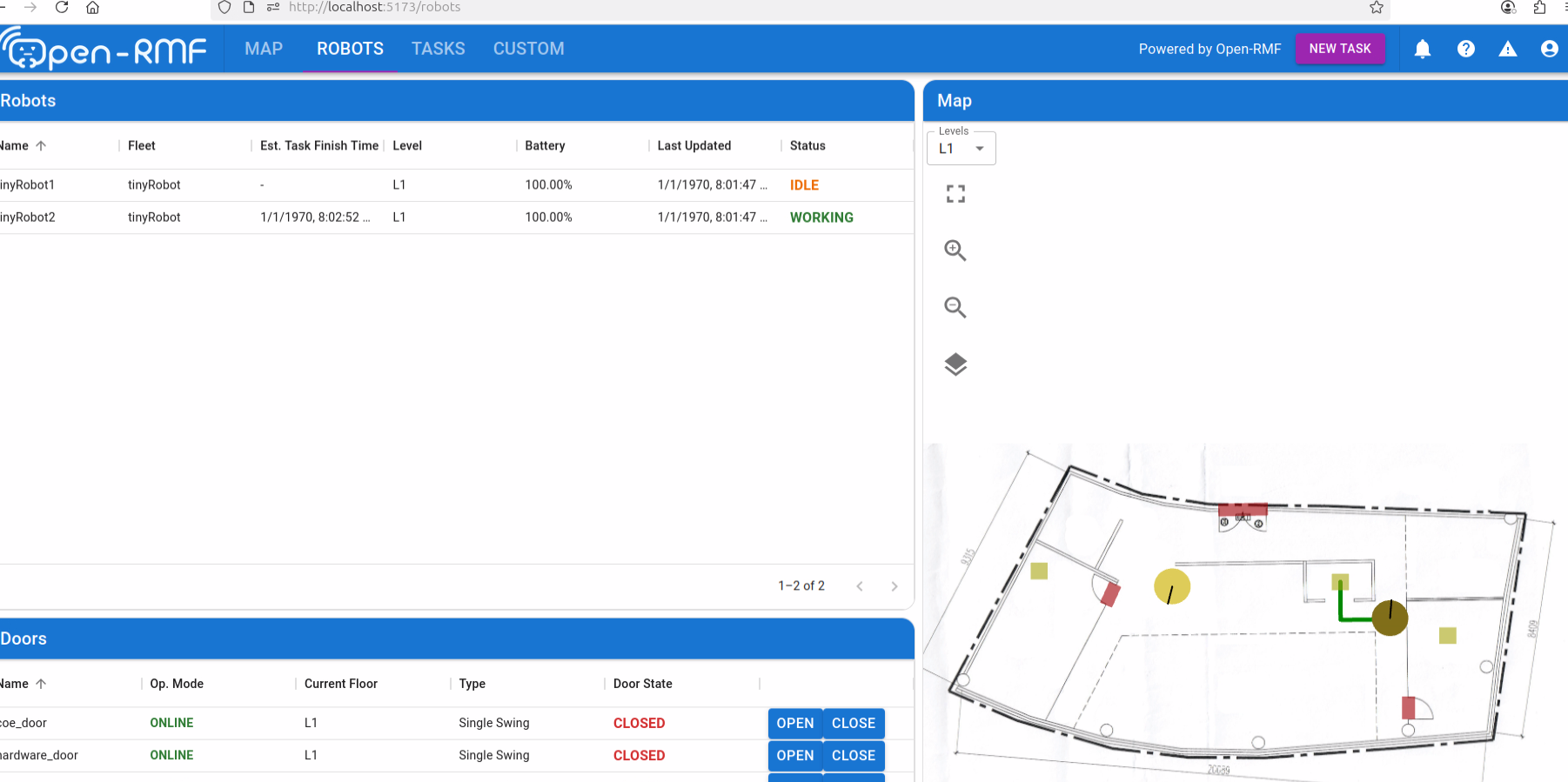
正常情况,应该能显示机器人、门和地图等实时状态
纠错,疑问,交流: 请进入讨论区或 请点击进入页面,扫码加入微信群或Q群进行交流
获取最新文章: 扫一扫加入“创客智造”公众号