



















ROS2与Open-RMF仿真教程-安装Open-RMF(22.09版)
纠错,疑问,交流: 请进入讨论区或 请点击进入页面,扫码加入微信群或Q群进行交流
获取最新文章: 扫一扫加入“创客智造”公众号
ROS2与Open-RMF仿真教程-安装Open-RMF(22.09版)
说明:
- 介绍如何安装Open-RMF
- 环境:ubuntu22.04 + humble
- RMF 22.09版本
Open-RMF:
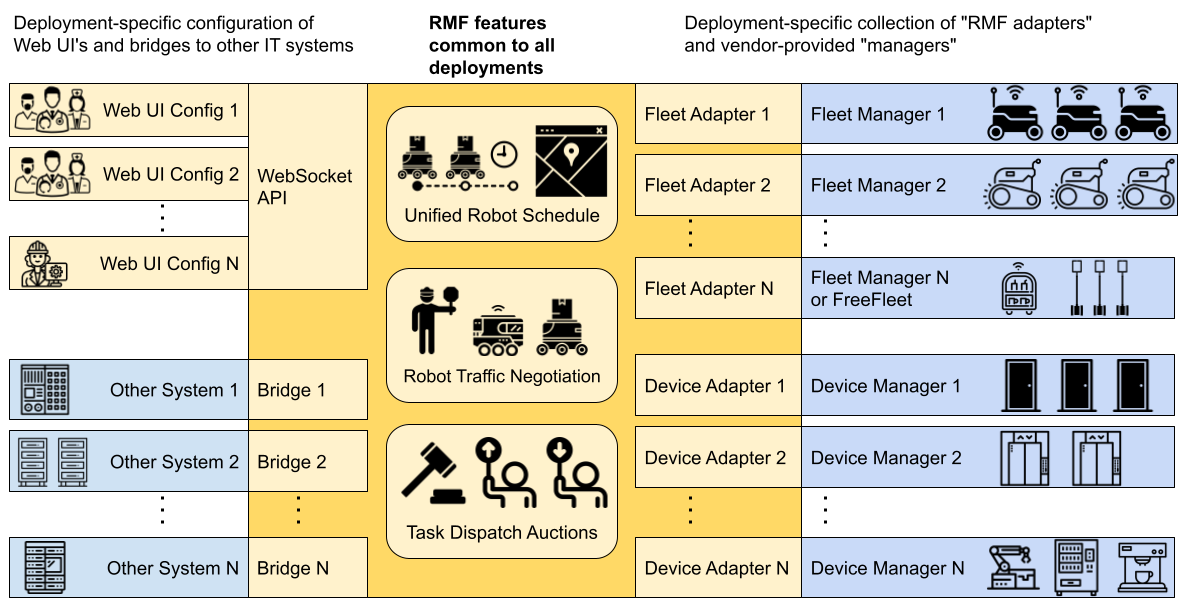
- Open-RMF是一个异构多智能体协同调度系统,用于协调不同机器人车队进行不同任务管理的可视化管理系统
- 架构图
源码安装步骤:
- RCM安装参考教程
- RCM桌面版安装:
rm online.sh ; wget https://gitee.com/ncnynl/commands/raw/master/online.sh ; sudo chmod +x ./online.sh; ./online.sh- RCM命令行版安装
rm online_shell.sh ; wget https://gitee.com/ncnynl/commands/raw/master/online_shell.sh ; sudo chmod +x ./online_shell.sh; ./online_shell.sh- RCM安装RMF流程, 具体安装脚本查看
cs -s install_rmf_humble_source-
搜索脚本,找ros2_rmf分类下的脚本ID进行安装
-
安装过程下载模型,时间比较长(60分钟+), 根据设备性能和网络情况,可能会失败
cs -s install_rmf_panel- 搜索脚本,找ros2_rmf分类下的脚本ID进行安装
测试:
- 启动office
ros2 launch rmf_demos_gz_classic office.launch.xml server_uri:="ws://localhost:7878"- 启动panel
cd ~/ros2_rmf_ws/rmf-panel-js
./load_http.sh- 打开浏览器,输入地址
http://localhost:3000, 具体使用参考
参考:
纠错,疑问,交流: 请进入讨论区或 请点击进入页面,扫码加入微信群或Q群进行交流
获取最新文章: 扫一扫加入“创客智造”公众号