



















OpenDuckMini快速入门教程-开箱指南
纠错,疑问,交流: 请进入讨论区或 请点击进入页面,扫码加入微信群或Q群进行交流
获取最新文章: 扫一扫加入“创客智造”公众号
欢迎加入我们的openduckmini交流群,微信扫描右侧二维码立即进群交流

文章说明
- 本教程主要介绍在购买openduckmini后的开箱操作
- 本教程主要适用于购买自
创客智造的OpenDuckMini标准版设备- 树莓派zero2w中系统的
用户名称和用户密码均为raspios
相关设备
OpenDuckMini套件: 采购地址
快速测试步骤
1.组装支架
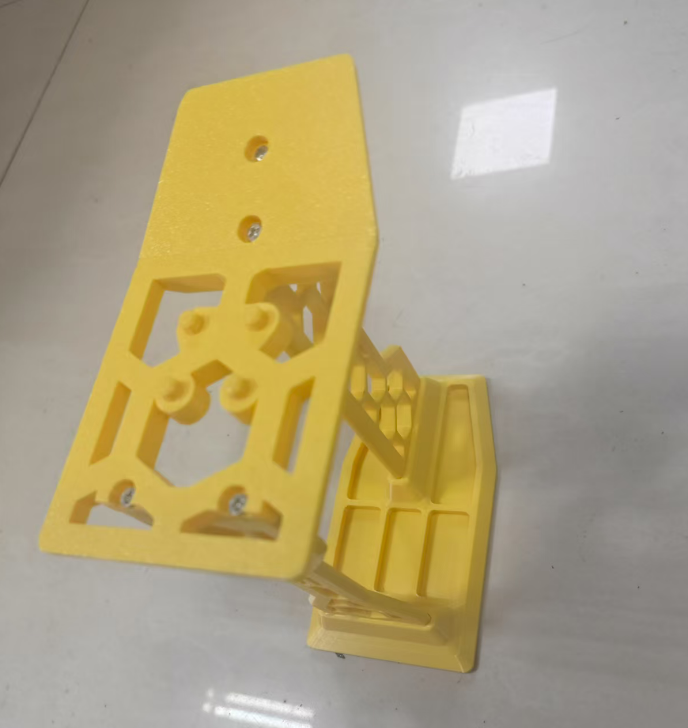
- 设备收到之后,先组装好支架
- 按照下图来拼接支架,使用m3x10螺丝固定上面的面板
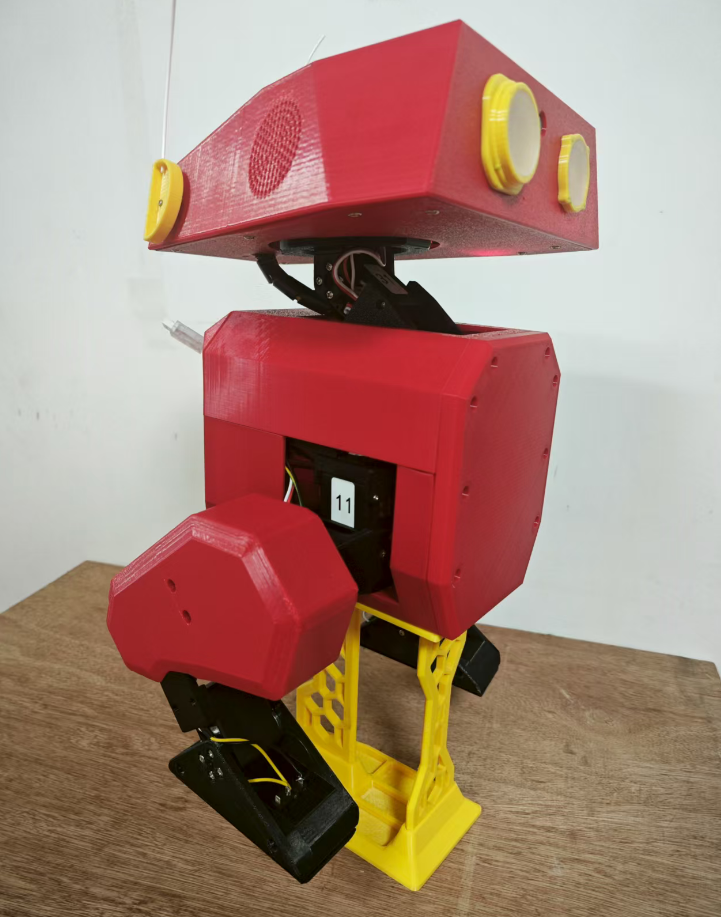
- 然后架高鸭子,将支架凸起部分对准鸭子屁股底下螺丝槽就能平稳放置
2. 接上低压报警器
- 由于鸭子使用的是3s的航模电池,所以使用鸭子时都要接上低压报警器,避免电池过放
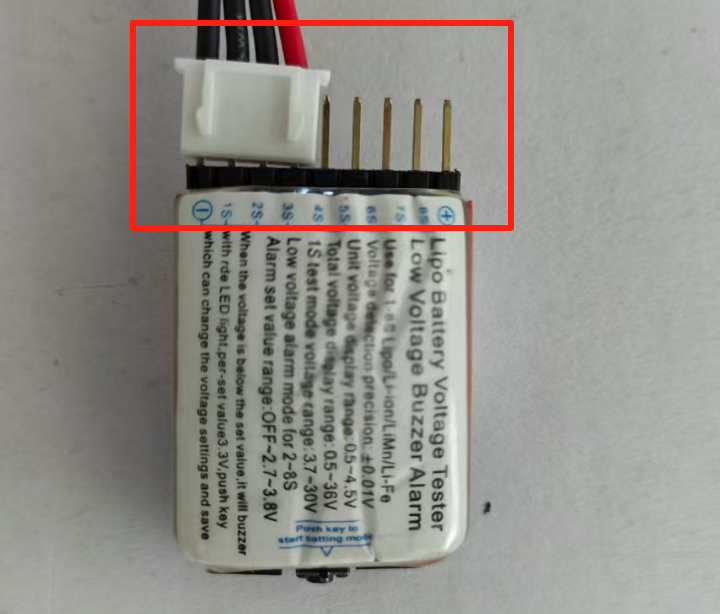
- 电池总电压低于11.1v时,就需要进行充电
使用时,要谨记避免电池过充或者过放,否则会导致电池损坏
3.连接树莓派发布的热点open duckmini
- 由于我们预先配置过树莓派,若树莓派开机后没有连上wifi的话,会自动启动名称为
openduckmini的热点 - 可以使用手机或者电脑连上名称为
openduckmini的热点
如果没有找到热点,关闭wifi再重新打开刷新列表
4.登录web控制页面
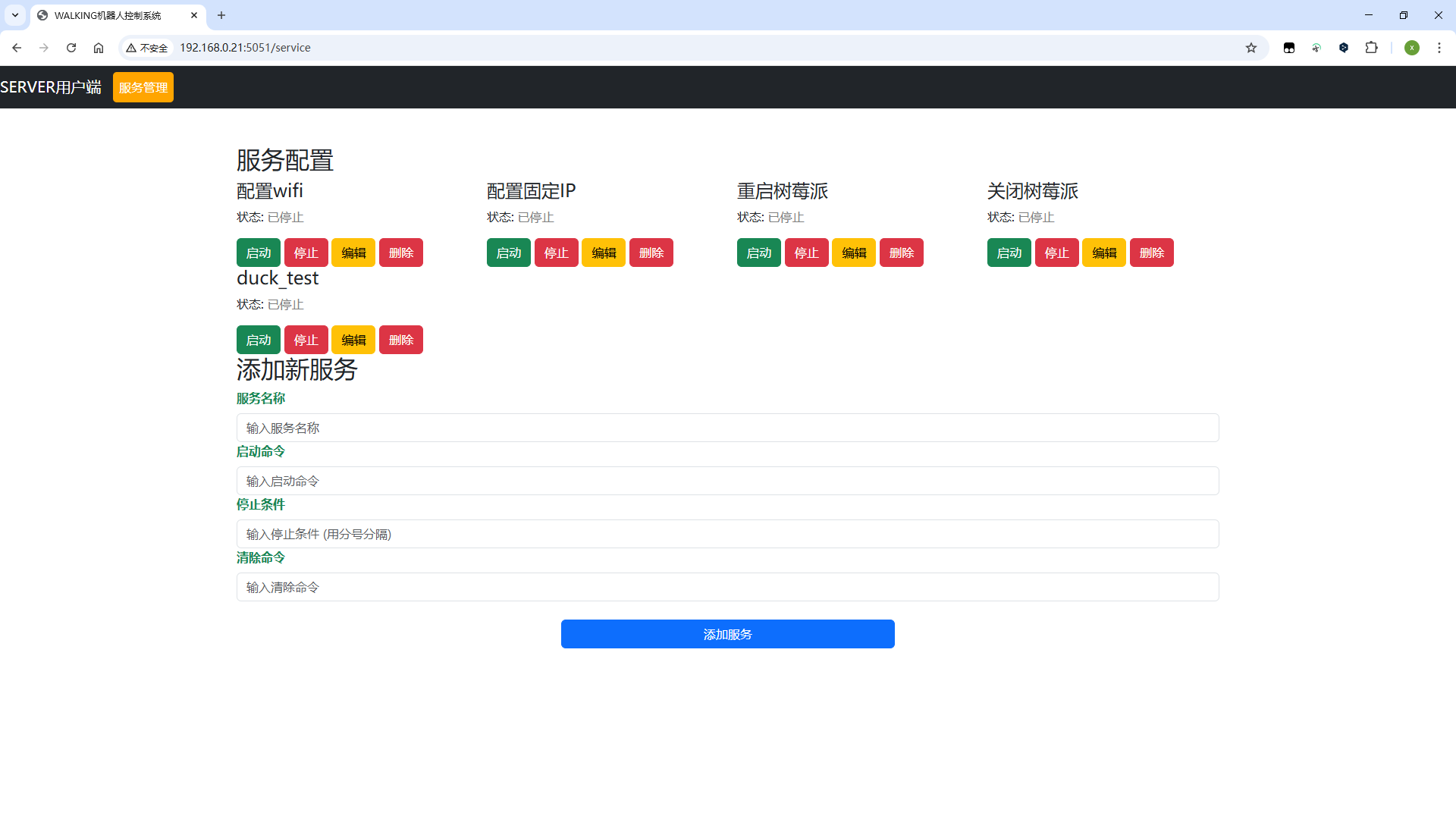
- 连上热点之后,打开手机或者电脑的浏览器输入
192.168.12.1:5051进入到web控制页面
5.web端启动行走测试
- 手柄靠近鸭头,然后按下中间的按钮,手柄的蓝灯亮起即为已匹对上

- 然后点击网页端上面的
duck_test服务上的启动按钮
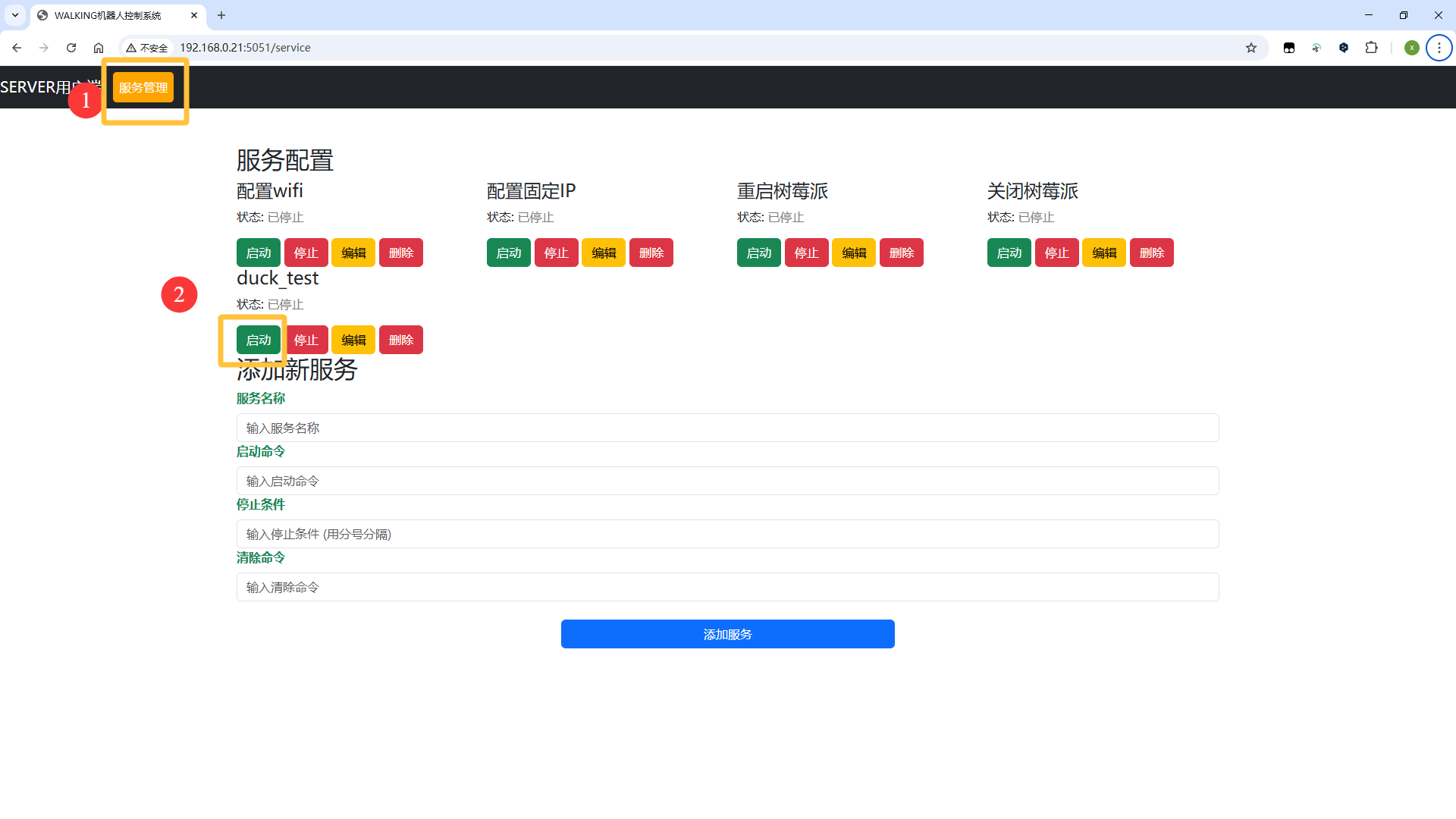
- 正常情况下,程序启动十多秒后,鸭子眼部LED会自动亮起
- 启动成功后按下手柄右侧的x按钮,就可以解除暂停模式
- 控制左侧摇杆移动鸭子
- 详细操作可参阅教程:OpenDuckMini快速入门教程-测试行走
- 当测试完后,同样点击
停止按钮中止这个进程
另外,也可以在web端上面进行重启树莓派或者关闭树莓派等操作
终端测试步骤
除了web端页面进行快速测试之外,也可以使用终端输入命令进行详细测试
1.远程SSH登录到树莓派
- 连接上树莓派的热点之后,使用电脑直接远程SSH登录到树莓派上
SSH工具可以直接使用win下的
PowerShell或MobaXterm等等,或者直接用Linux下的终端
- 热点模式下的树莓派的IP为
192.168.12.1
用户名称和用户密码均为raspios
$ ssh raspios@192.168.12.12.启动简单的测试脚本
$ cd ~/open_duck_mini_ws/tools
$ ls
check_antennas_with_ps4.py  check_imu.py             check_ps4.py     turn_on.py
check_cam.py                check_motors.py          check_sounds.py  turn_straight.py
check_eyes.py               check_motors_pid.py      check_feet_contacts.py
check_motors_voltage.py  turn_off.py

# 例如运行舵机检查脚本
$ python  check_motors.py
Initializing hardware interface...
Attempting to connect to motor controller...
Attempting to connect to motor controller...
Successfully connected to hardware!

Turning on motors with low torque (one by one)...
Setting low torque for motor 'left_hip_yaw' (ID: 20)...
d_coefficient: [0]
✓ Low torque set successfully for motor 'left_hip_yaw' (ID: 20).
Setting low torque for motor 'left_hip_roll' (ID: 21)...
d_coefficient: [0]
✓ Low torque set successfully for motor 'left_hip_roll' (ID: 21).
Setting low torque for motor 'left_hip_pitch' (ID: 22)...
d_coefficient: [0]
✓ Low torque set successfully for motor 'left_hip_pitch' (ID: 22).
Setting low torque for motor 'left_knee' (ID: 23)...
d_coefficient: [0]
✓ Low torque set successfully for motor 'left_knee' (ID: 23).
Setting low torque for motor 'left_ankle' (ID: 24)...
d_coefficient: [0]
✓ Low torque set successfully for motor 'left_ankle' (ID: 24).
Setting low torque for motor 'neck_pitch' (ID: 30)...
d_coefficient: [0]
✓ Low torque set successfully for motor 'neck_pitch' (ID: 30).
Setting low torque for motor 'head_pitch' (ID: 31)...
d_coefficient: [0]
✓ Low torque set successfully for motor 'head_pitch' (ID: 31).
Setting low torque for motor 'head_yaw' (ID: 32)...
d_coefficient: [0]
✓ Low torque set successfully for motor 'head_yaw' (ID: 32).
Setting low torque for motor 'head_roll' (ID: 33)...
d_coefficient: [0]
✓ Low torque set successfully for motor 'head_roll' (ID: 33).
Setting low torque for motor 'right_hip_yaw' (ID: 10)...
d_coefficient: [0]
✓ Low torque set successfully for motor 'right_hip_yaw' (ID: 10).
Setting low torque for motor 'right_hip_roll' (ID: 11)...
d_coefficient: [0]
✓ Low torque set successfully for motor 'right_hip_roll' (ID: 11).
Setting low torque for motor 'right_hip_pitch' (ID: 12)...
d_coefficient: [0]
✓ Low torque set successfully for motor 'right_hip_pitch' (ID: 12).
Setting low torque for motor 'right_knee' (ID: 13)...
d_coefficient: [0]
✓ Low torque set successfully for motor 'right_knee' (ID: 13).
Setting low torque for motor 'right_ankle' (ID: 14)...
d_coefficient: [0]
✓ Low torque set successfully for motor 'right_ankle' (ID: 14).

Checking if all motors are responsive...
Attempting to read position from motor 'left_hip_yaw' (ID: 20)...
✓ Motor 'left_hip_yaw' (ID: 20) is responsive. Position: -0.002
Attempting to read position from motor 'left_hip_roll' (ID: 21)...
✓ Motor 'left_hip_roll' (ID: 21) is responsive. Position: 0.000
Attempting to read position from motor 'left_hip_pitch' (ID: 22)...
✓ Motor 'left_hip_pitch' (ID: 22) is responsive. Position: -0.001
Attempting to read position from motor 'left_knee' (ID: 23)...
✓ Motor 'left_knee' (ID: 23) is responsive. Position: -0.001
Attempting to read position from motor 'left_ankle' (ID: 24)...
✓ Motor 'left_ankle' (ID: 24) is responsive. Position: -0.001
Attempting to read position from motor 'neck_pitch' (ID: 30)...
✓ Motor 'neck_pitch' (ID: 30) is responsive. Position: 0.000
Attempting to read position from motor 'head_pitch' (ID: 31)...
✓ Motor 'head_pitch' (ID: 31) is responsive. Position: 0.04
Attempting to read position from motor 'head_yaw' (ID: 32)...
✓ Motor 'head_yaw' (ID: 32) is responsive. Position: -0.002
Attempting to read position from motor 'head_roll' (ID: 33)...
✓ Motor 'head_roll' (ID: 33) is responsive. Position: -0.003
Attempting to read position from motor 'right_hip_yaw' (ID: 10)...
✓ Motor 'right_hip_yaw' (ID: 10) is responsive. Position: 0.001
Attempting to read position from motor 'right_hip_roll' (ID: 11)...
✓ Motor 'right_hip_roll' (ID: 11) is responsive. Position: -0.001
Attempting to read position from motor 'right_hip_pitch' (ID: 12)...
✓ Motor 'right_hip_pitch' (ID: 12) is responsive. Position: 0.001
Attempting to read position from motor 'right_knee' (ID: 13)...
✓ Motor 'right_knee' (ID: 13) is responsive. Position: 0.00
Attempting to read position from motor 'right_ankle' (ID: 14)...
✓ Motor 'right_ankle' (ID: 14) is responsive. Position: -0.000

--- Motor Movement Test ---
This will move each motor by a small amount to check if it's working correctly.
Press Enter to begin the movement test...

Testing motor: 'left_hip_yaw' (ID: 20)
Test this motor? (Enter/y for yes, n to skip, q to quit): q
Exiting movement test...

Turning off motors one by one...
Disabling torque for motor 'left_hip_yaw' (ID: 20)...
✓ Motor 'left_hip_yaw' (ID: 20) turned off successfully.
Disabling torque for motor 'left_hip_roll' (ID: 21)...
✓ Motor 'left_hip_roll' (ID: 21) turned off successfully.
Disabling torque for motor 'left_hip_pitch' (ID: 22)...
✓ Motor 'left_hip_pitch' (ID: 22) turned off successfully.
Disabling torque for motor 'left_knee' (ID: 23)...
✓ Motor 'left_knee' (ID: 23) turned off successfully.
Disabling torque for motor 'left_ankle' (ID: 24)...
✓ Motor 'left_ankle' (ID: 24) turned off successfully.
Disabling torque for motor 'neck_pitch' (ID: 30)...
✓ Motor 'neck_pitch' (ID: 30) turned off successfully.
Disabling torque for motor 'head_pitch' (ID: 31)...
✓ Motor 'head_pitch' (ID: 31) turned off successfully.
Disabling torque for motor 'head_yaw' (ID: 32)...
✓ Motor 'head_yaw' (ID: 32) turned off successfully.
Disabling torque for motor 'head_roll' (ID: 33)...
✓ Motor 'head_roll' (ID: 33) turned off successfully.
Disabling torque for motor 'right_hip_yaw' (ID: 10)...
✓ Motor 'right_hip_yaw' (ID: 10) turned off successfully.
Disabling torque for motor 'right_hip_roll' (ID: 11)...
✓ Motor 'right_hip_roll' (ID: 11) turned off successfully.
Disabling torque for motor 'right_hip_pitch' (ID: 12)...
✓ Motor 'right_hip_pitch' (ID: 12) turned off successfully.
Disabling torque for motor 'right_knee' (ID: 13)...
✓ Motor 'right_knee' (ID: 13) turned off successfully.
Disabling torque for motor 'right_ankle' (ID: 14)...
✓ Motor 'right_ankle' (ID: 14) turned off successfully.

Motor test completed.- 运行之后,终端会输出当前各个舵机的信息,id号和舵机当前位置等
3.快速进行已配置好的行走测试
- 手柄靠近鸭头,然后按下中间的按钮,手柄的蓝灯亮起即为已匹对上
- 终端输入快速测试命令
$ duck_test
pygame 2.6.0 (SDL 2.28.4, Python 3.11.2)
Hello from the pygame community. https://www.pygame.org/contribute.html
Done parsing args
dict_keys(['left_hip_yaw', 'left_hip_roll', 'left_hip_pitch', 'left_knee', 'left_ankle', 'neck_pitch', 'head_pitch', 'head_yaw', 'head_roll', 'right_hip_yaw', 'right_hip_roll', 'right_hip_pitch', 'right_knee', 'right_ankle'])
d_coefficient: [0, 0, 0, 0, 0, 0, 0, 0, 0, 0, 0, 0, 0, 0]
d_coefficient: [0, 0, 0, 0, 0, 0, 0, 0, 0, 0, 0, 0, 0, 0]
turn on : low KPS set
turn on : init pos set
d_coefficient: [0, 0, 0, 0, 0, 0, 0, 0, 0, 0, 0, 0, 0, 0]
turn on : high kps
Loaded joystick with 6 axes.
[Poly ref data] Processing ...
[Poly ref data] Done processing
Loaded: beep1.wav
Loaded: happy1.wav
Loaded: lamp.wav
Loaded: lamp3.wav
Loaded: motor.wav
Loaded: beep2.wav
Loaded: lamp2.wav
Loaded: happy2.wav
Loaded: happy3.wav
Done instantiating RLWalk
Starting- 正常情况下,程序启动十多秒后,鸭子眼部LED会自动亮起
- 启动成功后按下手柄右侧的x按钮,就可以解除暂停模式
- 控制左侧摇杆移动鸭子
- 详细操作可参阅教程:OpenDuckMini快速入门教程-测试行走
演示视频
<iframe height=498 width=100% src="//player.bilibili.com/player.html?isOutside=true&aid=114930539890309&bvid=BV1o38JzrEwh&cid=31336432504&p=1&high_quality=1&danmaku=0" scrolling="no" border="0" frameborder="no" framespacing="0" allowfullscreen="true"></iframe>纠错,疑问,交流: 请进入讨论区或 请点击进入页面,扫码加入微信群或Q群进行交流
获取最新文章: 扫一扫加入“创客智造”公众号
欢迎加入我们的openduckmini交流群,微信扫描右侧二维码立即进群交流